
 Security Product Engineering















In the previous blog on building production Jira apps on Forge, we covered project structure, manifest.yml, Forge SQL, triggers, and resolvers. This blog is about what happens next: when real customers install it, real data flows through it, and real edge cases hit it. This Forge production guide covers security, encrypted variables, production pitfalls, deployment, distribution, and honest guidance on when Forge is the right tool. If you are starting from scratch, the Atlassian Forge tutorial covers the platform and architecture first.
Security, permissions & scopes
Getting security wrong in a Forge app is expensive to fix post-launch. Scope changes require customer admin reapproval, secrets mishandled in module-level state cause tenant data leakage, and a single unguarded SQL query opens injection risks. The sections below cover each of these in the order they are most likely to catch you out.
Declare scopes upfront — this cannot be overstated
Changing scopes in a new version requires every existing customer's admin to reapprove the installation. There is no workaround. Plan your full permission surface before v1.
yaml
permissions:
  scopes:
    - read:jira-work
    - write:jira-work
    - read:jira-user
    - manage:jira-configuration
    - storage:app
  external:
    fetch:
      backend:
        - address: api.yourexternalsystem.com  # Allowlist every domain
Encrypted variables
Set secrets via the CLI. Forge encrypts them at rest and decrypts them at runtime — process.env.KEY is the correct access pattern in function code:
bash
forge variables set API_KEY "secret" –encrypt

typescript
const apiKey = process.env.API_KEY; // Decrypted automatically at runtime
Environment variables cannot be accessed by the frontend directly. If you need them in the UI, return them via a resolver — but be aware they become visible in network traffic.
The warm container trap
Forge reuses Lambda containers across invocations for performance. Module-level mutable state bleeds between tenant executions:
typescript
// Tenant A's data contaminates Tenant B's invocation
let cachedConfig = null;
export const handler = async () => {
  if (!cachedConfig) cachedConfig = await getConfig();
  return cachedConfig;
};

// Always scope state inside the invocation
export const handler = async (event, context) => {
  const config = await getConfig(); // Fresh per invocation
  return config;
};
This is one of the most common sources of production bugs in Forge apps. If you use in-memory caches, always partition by a tenant identifier such as cloudId.
Always Use Parameterized Queries
typescript
//  Safe
await sql
  .prepare('SELECT * FROM sample WHERE status = ?')
  .bindParams('PENDING')
  .execute();

//  Never — SQL injection risk
`SELECT * FROM sample WHERE status = '${status}'`
Avoid dynamic column or sort field injection too. Never trust ORDER BY ${payload.sort} — use an explicit allowlist of permitted values.
H3: Mask API keys before returning to frontend
typescript
// Never expose raw keys to the frontend
const masked = '*'.repeat(Math.max(0, key.length - 4)) + key.slice(-4);
Outbound webhooks — handle failures correctly
When calling external systems from a Jira event handler, always set explicit timeouts and never let external failures crash the handler:
typescript
try {
  const controller = new AbortController();
  const timeout = setTimeout(() => controller.abort(), 10000);

  await fetch('https://api.external.com/update', {
    method: 'POST',
    signal: controller.signal,
    headers: { Authorization: `Bearer ${config.api_key}` },
    body: JSON.stringify({ key: issueKey, status: externalStatus })
  });

  clearTimeout(timeout);
  await updateStatus(issueKey, 'SUCCESS');

} catch (err) {
  // Never re-throw from a Jira event handler
  await updateStatus(issueKey, 'FAILED', String(err));
}
Always set explicit timeouts on external fetch calls. Always catch. Never let an external failure crash into a Jira event handler.
Real-world production challenges
These are the failure modes that don't surface in local development. Each one has broken production Atlassian Forge apps that were otherwise well-built.
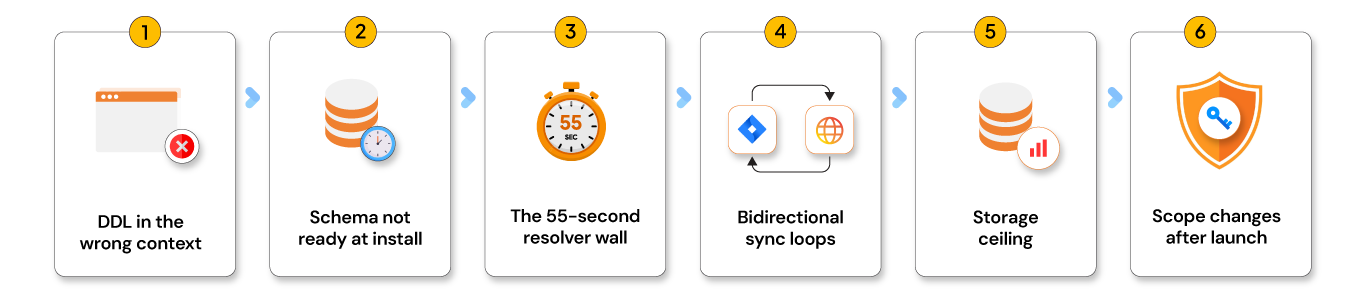
- DDL in the wrong context. Calling
CREATE TABLEfrom a resolver or webtrigger silently fails or throws a confusing error. DDL belongs only in scheduled triggers and lifecycle event handlers. - Schema not ready at install. The install event fires immediately. The DDL may not complete within the same execution window. Wrap all DB calls in
try/catchand surface a "Setting up, please wait" state to users during that window. - The 55-second resolver wall. Any complex operation — external API calls, bulk reads, sync jobs — will hit this limit. Resolvers must orchestrate, not execute. Fire async, return a job-started response.
- Bidirectional sync loops. A Jira update triggers your event handler, which updates the external system, which fires a webhook back to Forge, which updates Jira again. Break the cycle with a
last_synced_by: 'JIRA' | 'EXTERNAL'field and check it before processing. - Storage ceiling. Even with 1 GiB production storage, audit logs and sync history accumulate fast. Implement retention policies from the start — monitor DB size, archive old records, and purge on a schedule.
- Scope changes after launch. Need a new external domain or Jira permission? Every existing customer's admin must reapprove. There is no exception. Plan upfront.
Logging best practices
Structured logs are essential — forge tunnel and streaming logs only work in development. In production, logs are limited and have no live streaming.
typescript
console.log(JSON.stringify({
  event: 'sync_completed',
  records: count,
  duration_ms: Date.now() - start,
  status: 'SUCCESS'
}));
Never log:
• API keys, tokens, or credentials
• Jira issue descriptions or comments
• Personally identifiable information
For production sites you don't have direct access to, ask the Jira admin to download logs via the Developer Console. Build an audit_log table in Forge SQL for anything that matters to your debugging workflow — it outlasts log retention windows.
Forge app deployment & distribution
Forge ships apps across three environments — development, staging, and production — all managed through the Forge CLI. The commands below cover the full deployment lifecycle, from first install to production release, along with the three distribution paths available once your app is ready for customers.
Deployment commands
bash

# Development
forge deploy -e development
forge install --site yoursite.atlassian.net --product jira -e development
forge tunnel                           # Hot reload

# Staging and production
forge deploy -e staging
forge deploy -e production

# Useful commands
forge lint                             # Validate manifest before deploying
forge webtrigger                       # Get webhook URLs per environment
forge logs -e development -f           # Stream logs
forge variables set KEY val --encrypt  # Set encrypted secret
After setting environment variables with forge variables set, you must run forge deployment for changes to take effect — they are not applied until the next deployment.
Three distribution options
Private — your team only. No listing required. Best for internal tools.
Shared — direct install link for specific customers. No Marketplace review needed.
Marketplace — public listing reaching 300,000+ Atlassian customers. Requires Atlassian security review, documented scopes, egress domain disclosure, and a privacy policy.
When must you use Forge
Forge is the right choice for:
- Jira integrations syncing external data into issues and epics
- Workflow automation triggered by Jira events
- Admin dashboards and configuration UIs
- Inbound webhook processing from external systems
- Bidirectional status sync between Jira and external platforms
- Any app targeting the Atlassian Marketplace
Forge gets harder when:
- You need real-time WebSocket connections — not natively supported
- You're processing datasets that push per-install storage limits
- You need non-JavaScript runtimes — Forge is Node.js only
- You require complex OLAP-style queries — Forge SQL is OLTP-optimized
Quick references
COMMANDS
| forge create | Scaffold new app |
| forge tunnel | Hot reload (dev only) |
| forge deploy -e prod | Ship to production |
| forge logs -e dev -f | Stream live logs |
| forge webtrigger | List inbound HTTP URLs |
| forge lint | Validate manifest |
TIMEOUTS
| Resolver / Webtrigger | 55 seconds |
| Scheduled trigger | 900 seconds (set timeoutSeconds: 900 in manifest) |
FORGE SQL LIMITS (as of May 2026)
| Production storage | 1 GiB per installation |
| Staging storage | 256 MiB |
| Development storage | 128 MiB |
| SELECT timeout | 5 seconds |
| INSERT/UPDATE/DELETE | 10 seconds |
| DDL timeout | 20 seconds |
| Max tables | 200 per installation |
RULES
| DDL (CREATE/ALTER) | Scheduled trigger context ONLY |
| SQL multi-tenancy | Automatic — Forge isolates per installation |
| External systems | You must implement tenant isolation yourself |
| Module-level variables | Never — bleeds between warm container invocations |
| Event handler errors | Always catch — Jira retries cause duplicate processing |
| Scope changes | Require admin reapproval on every existing installation |
| AUTO_INCREMENT | Avoid — use AUTO_RANDOM or UUID as BINARY(16) |
Forge rewards developers who design around its constraints rather than against them. Embrace serverless architecture, event-driven processing, bounded execution, and managed infrastructure — and you can build highly scalable Jira cloud apps with very little operational overhead.
Ready to ship?
Building on Forge is one thing. Shipping it right — secure, scalable, and ready for real customers — is another. Opcito's engineers have been there, and they are ready to help you get there faster. Let's talk.
Comments
Related Blog /Articles





Ready to transform your FinTech Application?
Explore our VAPT as a Service portfolio or speak with our team to discuss your security testing requirements.