
 Security Product Engineering
















Understand Vite's architecture before diving into its configuration.
For years, Vite was simply the command used to start React projects. A routine request to update a Vite proxy configuration led to a closer look at why Vite starts almost instantly, why Create React App began to feel slow, and how modern frontend tooling actually works.
What you'll learn
By the end of this article, you'll understand:
- Why Vite was created
- Why Create React App started feeling slow
- How native ES modules changed frontend development
A routine proxy configuration request
It started as a five-minute task: update the Vite proxy configuration.
On the surface, this looked like a routine change. Opening vite.config.ts to make a small update turned into something bigger: a closer look at what modern frontend tooling actually does behind the scenes.
Opening vite.config.ts for the first time
For a long time, Vite was just a tool used to start new React projects, and the workflow rarely changed:
npm create vite@latest
cd my-app
npm install
npm run dev
A few seconds later, the development server would be running, ready to build features on top of. That was the extent of most developers' relationship with Vite: it was faster than Create React App, it started almost instantly, and that was enough.
It's easy to never ask why it's fast, never open the documentation, and never touch vite.config.ts unless absolutely necessary. Vite becomes, simply, a better way to bootstrap a React project.
A CORS error and the Vite proxy configuration
The need to actually understand vite.config.ts usually comes from a familiar problem. The frontend application runs on:
http://localhost:5173
The backend API runs on:
http://localhost:8080
API requests start failing because of CORS. This is a common issue, and the fix almost every search result points to is the same:
"Configure a proxy in vite.config.ts."
That's the point where most developers open the configuration file for the first time.
Inside vite.config.ts: what the configuration options do
A first look at vite.config.ts rarely shows just one or two options. It typically looks like this:
ts
export default defineConfig({
  plugins: [/* ... */],
  server: { /* ... */ },
  resolve: { /* ... */ },
  css: { /* ... */ },
  optimizeDeps: { /* ... */ },
  build: { /* ... */ },
  preview: { /* ... */ },
  // ...and many more options
})
Most developers use Vite for months without knowing what these options do, which raises a few natural questions:
- What does
defineConfig()actually do? - Why is there a
serversection? - What is
optimizeDeps? - Why does Vite have its own plugin system?
- How does it know when to rebuild the application?
- Why is it so much faster than Create React App?
These questions point to a larger gap: most developers use only a small fraction of what Vite offers.
Why Vite feels fast: more than just ES modules
Digging into these questions usually turns into hours of reading documentation, testing configuration options, and working out how Vite actually functions.
Most developers, including experienced ones, use Vite every day without understanding what's happening behind the scenes. Ask "why is Vite fast?" and the most common answer is: "because it uses ES modules."
That's true, but it's only a small part of the story.
Beyond configuration: why Vite's features exist
Most Vite content explains how to configure it: individual options, API references, documentation walkthroughs. Far fewer explain why those features exist in the first place.
Understanding server.proxy at a surface level isn't enough. The more useful questions are:
- Why does Vite need a development server?
- Why does it use native ES modules?
- Why is dependency optimization necessary?
- Why does it use esbuild in one place and Rollup in another?
- Why does hot module replacement feel almost instant?
The goal of this article: not just to explain how to configure Vite, but why every major feature exists, so that opening vite.config.ts feels intuitive instead of overwhelming.
Why Vite exists: from Webpack to native ES modules
Before going further, it's worth asking a simple question: if Vite is just another frontend build tool, why was it created in the first place?
If Create React App already worked, why did the ecosystem need another build tool? The easy assumption is that Vite is simply a faster replacement for CRA. The fuller answer requires looking at how frontend development evolved over the last decade.
A brief history of frontend build tools: Grunt to Vite
Before Vite became the default choice for starting React projects, the tooling landscape looked very different. Each tool solved a specific problem of its time:
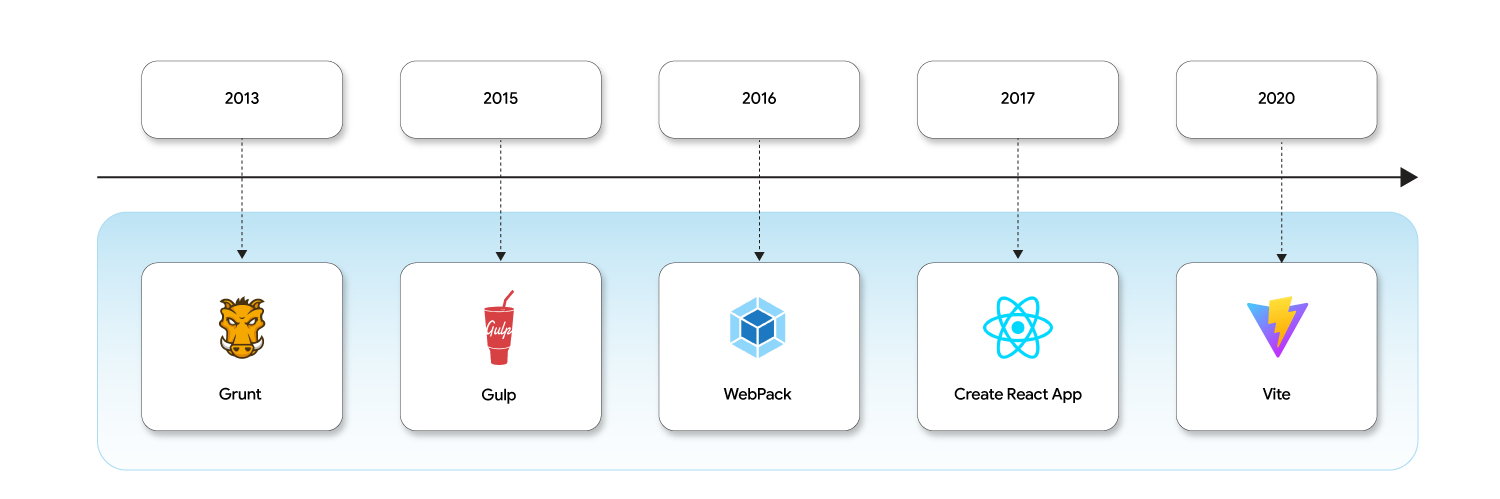
None of these tools replaced the one before it because it was "bad." Each appeared because developer needs kept changing.
How Create React App simplified React development
For many React developers, Create React App was the standard way to start a project:
npx create-react-app my-app
No Webpack configuration, no Babel setup, no build pipeline to manage. Everything worked out of the box, and for years CRA gave developers a genuinely good experience.
Behind the scenes, however, CRA relied heavily on Webpack. Most developers never noticed, because CRA hid that complexity behind a single command:
npm start
...and the application appeared in the browser.
Why large React projects slow down Webpack-based dev servers
The web didn't stand still, and applications kept getting bigger. A typical React project today might include:
src/
│
├── components/
│   └── 200+ components
│
├── pages/
│   └── 80+ pages
│
├── hooks/
│
├── contexts/
│
├── utils/
│
├── services/
│
└── assets/
Projects that once contained a few dozen files gradually grow into thousands. Before the browser can display the application, the tooling first needs to:
- Read the project.
- Build the dependency graph.
- Understand how files are connected.
- Transform the code.
- Bundle everything.
- Start the development server.
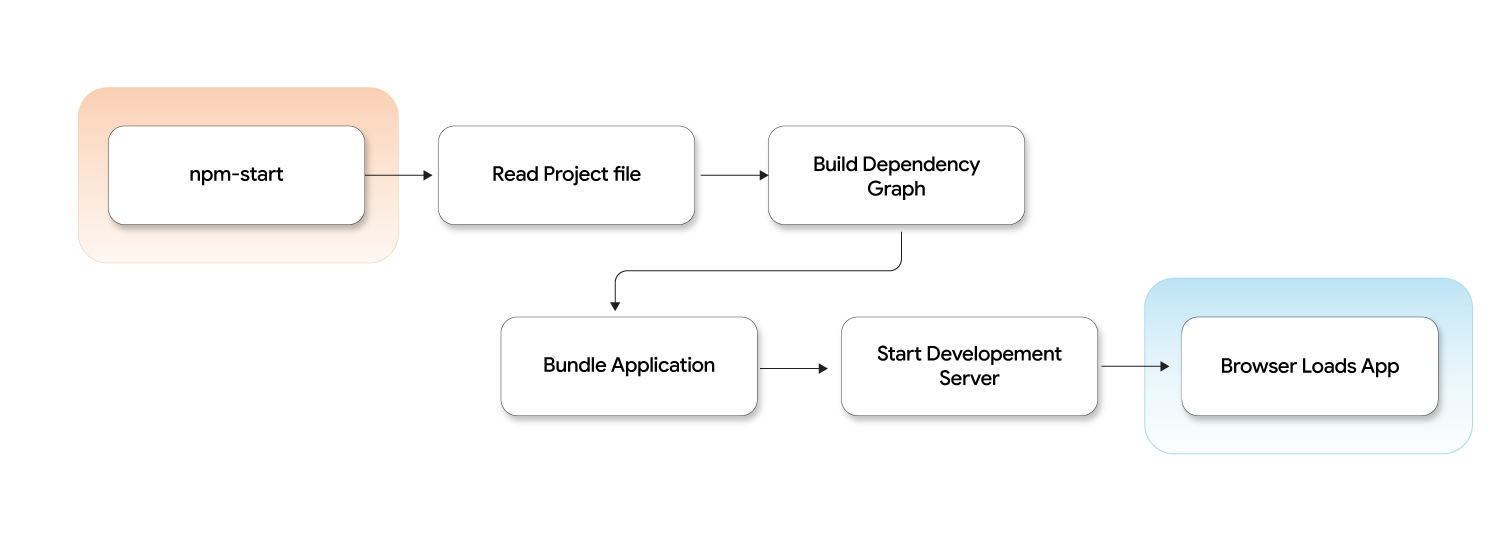
For small projects, this process is barely noticeable. For large enterprise applications, it becomes significantly more expensive.
The familiar slow-startup problem with Webpack and CRA
Every frontend developer has experienced some version of this: clone a large project, install dependencies, then run:
npm start
The terminal starts printing:
Compiling...
Building modules...
Generating bundles...
Eventually, the browser opens. The problem isn't limited to the initial startup, either. Every file save can trigger the tooling to rebuild significant parts of the application before the change becomes visible. A few seconds might not sound like much, but hundreds of times a week, this interrupts development flow, and protecting that flow is a meaningful part of developer productivity.
Why Webpack wasn't the real problem
Webpack was solving the right problem for its time: module bundling for browsers that had no native way to load JavaScript modules. The real change happened elsewhere. The browser evolved.
Modern browsers introduced support for native ES modules, making it possible to load JavaScript in a fundamentally different way. That single capability opened the door to a new development model, and it's exactly where Vite enters the picture.
Common misconception: Vite wasn't created because Webpack was "broken." It was created because browsers became powerful enough to support a fundamentally different approach to development.
How Vite's dev server actually works
This capability is what Vite's architecture is built on. Instead of bundling the entire application before the dev server starts, Vite serves source files directly to the browser and lets the browser's native module system resolve imports as the page runs.
This is the core reason startup time in Vite stays largely flat regardless of project size: there is no full-project bundle step blocking the server from starting.
Dependency pre-bundling with esbuild
Not everything in a project is source code written by the team. Third-party dependencies in node_modules are often shipped as CommonJS or as hundreds of small internal modules. Requesting each of these individually over the network would be slow, since native ESM resolution doesn't handle CommonJS and issuing hundreds of small HTTP requests carries real overhead.
To solve this, Vite pre-bundles dependencies before serving them:
- It uses esbuild to scan and pre-bundle
node_modulesdependencies into a small number of ESM-compatible files, cached innode_modules/.vite. - This happens once, or when dependencies change, not on every server start.
- esbuild is used here because it's written in Go and compiles dependencies significantly faster than JavaScript-based bundlers.
This is what optimizeDeps in vite.config.ts controls.
How hot module replacement (HMR) works
Because Vite serves modules individually over native ESM instead of a single bundle, it can also update modules individually when a file changes. When a file is saved:
- Vite's file watcher detects the change.
- It identifies exactly which module changed.
- It invalidates only that module in the module graph.
- It pushes an update to the browser over a WebSocket connection.
- The browser swaps in the new module without a full page reload or a rebuild of unrelated files.
Because only the changed module and its direct dependents are processed, HMR updates stay fast even as the project grows.
Why Vite uses esbuild and Rollup together
Vite hands dev-time speed and production-grade bundling to two different tools.
During development, it uses esbuild for dependency pre-bundling and on-the-fly file transforms, since esbuild compiles far faster than JavaScript-based tooling.
For production builds, Vite switches to Rollup, a mature, highly configurable bundler with strong tree-shaking and a large plugin ecosystem, built to produce optimized production output.
This explains a common point of confusion in vite.config.ts: optimizeDeps configures esbuild and only applies in development, while build configures Rollup and only applies to production output.
Key takeaways
- Create React App and Webpack solved real problems for their time; bundling everything upfront becomes expensive as a project grows.
- Native ES module support in modern browsers made a new development model possible.
- Vite wasn't created because Webpack was "bad"; it was created because the web had evolved.
- The
vite.config.tsfile covers plugins, dev server behavior (including proxying), module resolution, CSS handling, dependency optimization, and both build and preview output. - Dependency pre-bundling (via esbuild) makes third-party CommonJS and many-file packages compatible with native ESM and fast to load.
- HMR stays fast because Vite updates individual modules in the module graph instead of rebuilding a bundle.
- Vite uses esbuild for dev-time speed and Rollup for production-grade bundling, as two distinct configuration surfaces in
vite.config.ts.
Part 2 follows a single browser request step by step, showing exactly what happens after running npm run dev, using native ES modules. Have questions about modernizing your frontend tooling or build pipeline? Get in touch with Opcito's engineering experts.
Comments
Related Blog /Articles




Ready to transform your FinTech Application?
Explore our VAPT as a Service portfolio or speak with our team to discuss your security testing requirements.