
 Security Product Engineering















If you are evaluating Atlassian Forge or just starting out, this Atlassian Forge tutorial is the complete big-picture reference. All new Marketplace cloud apps must now be Forge-based — making Forge Atlassian's primary platform for Jira cloud extensibility. Atlassian Connect support ends by Q4 2026. Private and internal apps can still exist outside the Marketplace, and hybrid migration paths exist — but if you are building anything new for the Jira ecosystem, Forge is the platform to learn.
What is Atlassian Forge?
Atlassian Forge is a serverless, cloud-native platform for building apps on Jira Software, Confluence, Jira Service Management, and Bitbucket. You write functions, declare them in manifest.yml, and Forge handles the rest — hosted on Atlassian-managed infrastructure built on AWS.]
What Forge manages for you:
- Hosting, scaling, and runtime isolation
- Authentication — app context and user context, automatically
- Three built-in environments: development, staging, production
- Hosted storage: Key-Value Store, Custom Entity Store, Forge SQL, Object Store
- Sandboxed execution with controlled outbound network access
What you never touch:
- Servers, containers, or Kubernetes
- JWT auth infrastructure
- API gateways or load balancers
What is Jira and why extend it?
Jira Software is Atlassian's flagship issue tracking and project management tool, used by hundreds of thousands of teams globally. Out of the box it handles sprints, backlogs, workflows, and reporting — but every team's needs differ. That's where Jira app development comes in: custom panels, admin dashboards, external system integrations, automated workflows, and Marketplace SaaS products are all built on Jira's extensibility layer.
Forge vs Atlassian Connect — why the switch matters
Atlassian Connect was the previous app framework. Connect apps ran on developer-managed infrastructure — you hosted them, handled auth, and managed scaling. Forge inverts that model entirely.
| Dimension | Forge | Connect (Legacy) |
|---|---|---|
| Hosting | Atlassian-managed | Developer-managed |
| Authentication | Automatic, built-in | Manual JWT |
| Scaling | Serverless, automatic | Your responsibility |
| Security | Sandboxed + egress-controlled | Open |
| Status | Strategic platform | EOL Q4 2026 |
The migration timeline is firm:
- September 2025 — All new Marketplace cloud apps must be Forge-based
- Q4 2026 — Connect fully unsupported
How does Atlassian Forge work? The runtime explained
Forge apps run as serverless functions in a managed runtime environment, triggered by Jira events or user actions. Developers define their app structure in manifest.yml and deploy via the Forge CLI.
The Forge runtime uses native Node.js (currently Node.js 22.x). The full npm ecosystem is available — you can import any built-in, local, or third-party Node modules. The key constraints are not about the Node.js API surface but about two things:
Outbound network access — Your app can only make HTTP requests to domains explicitly declared in your manifest.yml egress allowlist. Any undeclared domain call will fail.
Filesystem persistence — You can read files packaged with your app, but you must not persist customer data to disk between invocations.
Note: nodejs20.x was deprecated on May 6, 2026. All new deployments must use nodejs22.x or higher.
Atlassian Forge architecture explained
Understanding Forge architecture is central to building production-grade Jira apps. Here is the end-to-end architecture of a typical production Forge integration:
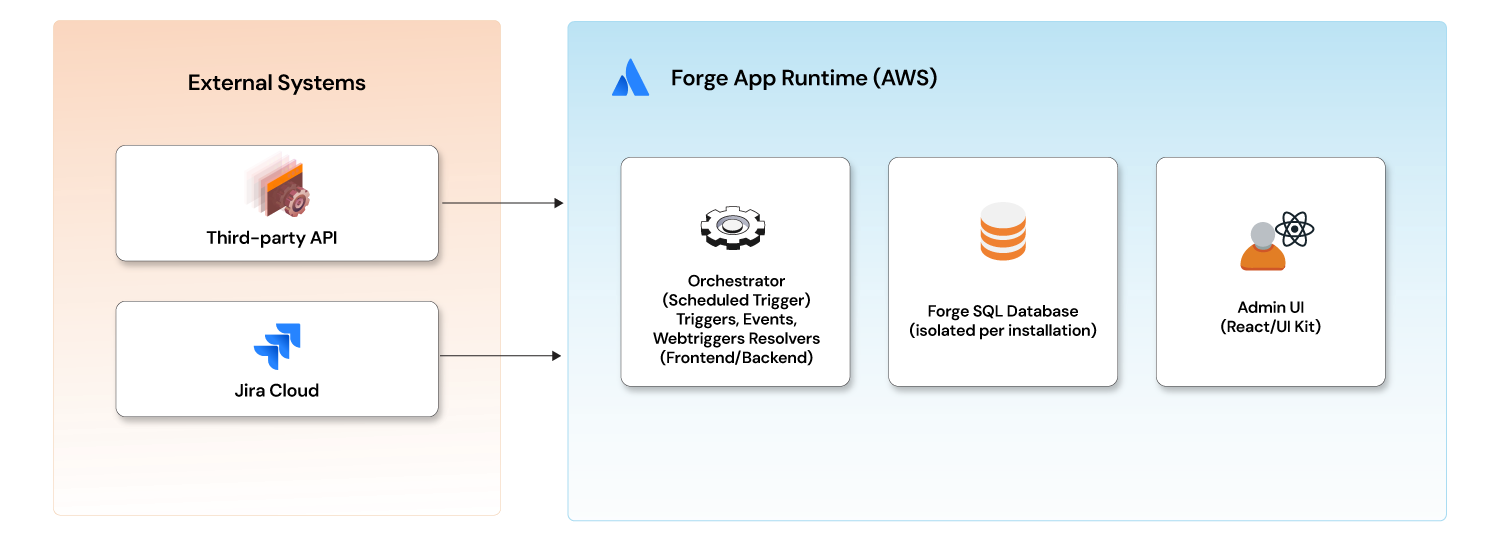
A user opens a Jira page → Forge renders your UI module → the frontend calls a resolver → the resolver calls Jira APIs or your database → data returns to the UI. Meanwhile, scheduled triggers run in the background, event handlers fire on Jira activity, and webtriggers receive inbound calls from external systems.
Forge UI Kit vs Custom UI
Forge gives developers two front-end paths, and the choice has long-term consequences for any serious Jira app development effort.
Forge UI Kit uses Atlassian's pre-built component library. It fits naturally into Jira's design system and is fast to build with — ideal for settings pages and simple admin screens.
Custom UI gives you full React and Vite freedom. For dashboards, complex data tables, advanced workflows, or any production-grade SaaS integration, Custom UI is the better long-term choice.
Forge storage — choosing the right option
Forge provides four storage options. Choosing correctly matters for performance, query capability, and scalability in production.
| Storage | Best For | Key Limitation |
|---|---|---|
| Key-Value Store (KVS) | Simple flags, counters, cached data | No querying, value size limits |
| Custom Entity Store | Queryable structured records | Still evolving, limited query ops |
| Forge SQL | Relational data, complex queries, full CRUD | 1 GiB production limit, OLTP only |
| Object Store | Binary/file storage | Early Access Program |
For any production integration involving relationships, history, or complex queries — Forge SQL is the right choice.
Scopes and egress — the Forge security mental model
Every Forge app declares exactly what it can access in manifest.yml. Jira enforces this at the platform level — no runtime overrides, no exceptions.
yaml
permissions:
  scopes:
    - read:jira-work        # Read issues, sprints, projects
    - write:jira-work       # Create and update issues
    - read:jira-user        # Read user profiles
    - storage:app           # Access Forge Storage
  external:
    fetch:
      backend:
        - address: api.yourexternalsystem.com
Critical rule: Changing scopes or adding new external domains in a future version requires every existing customer's admin to reapprove the installation. There is no workaround. Plan your full permission surface before shipping v1.
Is Forge right for your use case?
Forge is the right choice for:
- Jira integrations syncing external data into issues and epics
- Workflow automation triggered by Jira events
- Admin dashboards and configuration UIs
- Inbound webhook processing from external systems
- Bidirectional status sync between Jira and external platforms
- Any app targeting the Atlassian Marketplace — Forge is the only supported path post-Q4 2026
Forge gets harder when:
- You need real-time WebSocket connections — not natively supported
- You're processing datasets that push per-install storage limits
- You need non-JavaScript runtimes — Forge is Node.js only
- You require complex OLAP-style queries — Forge SQL is OLTP-optimized
Forge rewards developers who design around its constraints rather than against them. In Blog 2, we move from concepts to code — project structure, manifest.yml, Forge SQL, migrations, and the full component breakdown of a production app.
Building on Forge — or figuring out whether it is the right fit for your stack —https://www.opcito.com/blogs/forge-app-development involves decisions that compound quickly. Opcito's engineers have hands-on experience building and shipping production Forge apps and are happy to talk through your architecture, roadblocks, or migration path from Atlassian Connect. Get in touch with the team.
Comments
Related Blog /Articles





Ready to transform your FinTech Application?
Explore our VAPT as a Service portfolio or speak with our team to discuss your security testing requirements.