
 Security Product Engineering















In our first Atlassian Forge tutorial blog, we covered what Atlassian Forge is and how it works at a conceptual level. Now we build. This Forge app development reference covers every core component of a production-grade Forge app: project structure, the fully annotated manifest.yml, Forge SQL schema design with migrations, triggers, resolvers, webtriggers, and the orchestrator pattern that ties it together.
Scaffolding a Forge app
Every Forge app starts with four Forge CLI commands. Run these to scaffold, deploy, and install your app into a Jira Cloud instance:
bash
forge create         # Follow prompts — select Jira → Custom UI
forge tunnel         # Hot reload during development
forge deploy -e development
forge install --site yoursite.atlassian.net --product jira -e development
The default scaffold gives you a minimal starting point. For any production Forge app, you will restructure it immediately.
Recommended project structure
A scalable Forge app needs strong separation of concerns from day one. Here is the structure that holds up as complexity grows:
my-forge-app/
├── manifest.yml                 # Declares everything — modules, functions, permissions
├── src/
│   ├── index.ts                 # Re-exports all handlers cleanly
│   ├── config.ts                # External API endpoints and constants
│   ├── db/
│   │   ├── schema.sql           # DDL definitions
│   │   ├── sql-queries.ts       # All CRUD operations
│   │   └── setup-schema.ts      # migrationRunner configuration
│   ├── resolvers/
│   │   └── index.ts             # Frontend ↔ backend bridge (thin layer only)
│   ├── services/
│   │   ├── external-client.ts   # Third-party API calls
│   │   └── jira-client.ts       # Jira REST API helpers
│   ├── triggers/
│   │   ├── orchestrator.ts      # Central coordinator
│   │   ├── sync.ts              # Data sync logic
│   │   ├── create-tickets.ts    # Ticket creation
│   │   └── jira-events.ts       # Jira event handlers
│   └── webhooks/
│       └── handler.ts           # Webtrigger endpoints
└── static/my-app/               # React + Vite frontend
Rules that keep this maintainable
Four rules govern every file in this structure:
Triggersowns all scheduled and event-driven logicResolversis a thin bridge — validate, delegate, returnServiceshas zero Forge-specific imports — pure business logicDbowns every SQL query and schema definition
Breaking these boundaries is the fastest way to create a Forge app that becomes impossible to debug at scale.
The manifest.yml — fully annotated
The manifest.yml is the single source of truth for your entire Forge app. Every module, function, permission, and resource must be declared here. Nothing runs without it.
yaml
app:
  id: ari:cloud:ecosystem::app/your-app-uuid
  runtime:
    name: nodejs22.x               # Node.js 22.x — use latest supported runtime

modules:
  sql:
    - key: main
      engine: mysql                # Enables Forge SQL for this app

  trigger:
    - key: issue-updated
      function: issueUpdatedHandler
      events:
        - avi:jira:updated:issue
    - key: app-installed
      function: setupDbSchema
      events:
        - avi:ecosystem:installed:app

  scheduledTrigger:
    - key: orchestrator
      function: orchestratorFunction
      interval: fiveMinute         # minute | hour | day | week | fiveMinute
    - key: schema-maintenance
      function: setupDbSchema
      interval: hour

  webtrigger:
    - key: external-webhook
      function: webhookHandler

  jira:adminPage:
    - key: admin-config
      resource: main-ui
      render: native
      resolver:
        function: resolver
      title: App Configuration

  function:
    - key: resolver
      handler: resolvers/index.handler
    - key: orchestratorFunction
      handler: index.orchestratorFunction
      timeoutSeconds: 900          # Required for long-running scheduled work
    - key: setupDbSchema
      handler: index.setupDbSchema
      timeoutSeconds: 900
    - key: issueUpdatedHandler
      handler: index.issueUpdatedHandler
    - key: webhookHandler
      handler: index.webhookHandler

resources:
  - key: main-ui
    path: src/frontend/index.tsx

permissions:
  scopes:
    - read:jira-work
    - write:jira-work
    - read:jira-user
    - manage:jira-configuration
    - storage:app
  external:
    fetch:
      backend:
        - address: api.external.com
Important: Adding the sql module to an existing Forge app triggers a major version upgrade. Existing customers' admins must consent before updating. Plan Forge SQL adoption early — retrofitting it post-launch creates unnecessary friction for every installed customer.
Forge SQL — schema design & migrations
Forge SQL is a hosted, MySQL-compatible storage layer built on TiDB. It provisions a dedicated database instance per app installation — each customer's data lives in a completely isolated environment. You do not need to manually partition data with an installation_id column in your SQL tables for Forge-managed data. Forge handles that boundary automatically at the infrastructure level.
Forge SQL is optimised for transactional, operational data — not analytics or OLAP workloads.
The DDL rule nobody warns you about
Schema operations — CREATE TABLE, ALTER TABLE — must run inside scheduled trigger functions. Calling DDL from a resolver or webtrigger will fail unexpectedly. Always wire your schema setup to both the install event and a scheduled trigger:
yaml
scheduledTrigger:
  - key: schema-maintenance
    function: setupDbSchema
    interval: hour

trigger:
  - key: app-installed
    function: setupDbSchema
    events:
      - avi:ecosystem:installed:app
Migrations with migrationRunner
The migrationRunner from @forge/sql is how you manage schema evolution. It tracks which versions have already executed and skips them automatically:
typescript
import { migrationRunner } from '@forge/sql';

export async function setupDbSchema() {
  await migrationRunner
    .enqueue('v001_create_config_table', CREATE_CONFIG_TABLE_SQL)
    .enqueue('v002_create_config_index', CREATE_CONFIG_INDEX_SQL)
    .enqueue('v003_create_sample_table', CREATE_SAMPLE_TABLE_SQL)
    .enqueue('v004_add_status_column', `
      ALTER TABLE details ADD COLUMN status VARCHAR(50)
    `)
    .run();
}
Critical rule: Never modify a past migration. Only ever append new ones. Modifying an already-executed migration has no effect and creates confusion about the true state of your schema.
Schema recommendations
Avoid AUTO_INCREMENT on primary keys — it can cause hotspot issues on large datasets in TiDB. Use AUTO_RANDOM instead, or store UUIDs as BINARY(16):
sql
CREATE TABLE sample (
  id         BIGINT AUTO_RANDOM PRIMARY KEY,
  issue_key  VARCHAR(255) NOT NULL,
  status     VARCHAR(50),
  created_at TIMESTAMP DEFAULT CURRENT_TIMESTAMP
);
Forge SQL limits
Understanding these limits before you design your schema prevents painful architectural rework later.
Per-install storage:
| Environment | Storage limit |
|---|---|
| Production | 1 GiB |
| Staging | 256 MiB |
| Development | 128 MiB |
Query timeouts per connection:
| Operation | Timeout |
|---|---|
| SELECT | 5 seconds |
| INSERT, UPDATE, DELETE | 10 seconds |
| DDL (CREATE, ALTER) | 20 seconds |
Other limits:
| Resource | Limit |
|---|---|
| Tables per installation | 200 |
| DML requests per second | 150 |
| DDL requests per minute | 25 |
| Max row size | 6 MiB |
| Memory per query | 16 MiB |
| Request size | 1 MiB |
| Response size | 4 MiB |
Not supported: foreign keys, stored procedures, direct connection strings. All Forge SQL access must go through the @forge/sql SDK.
Batch deletes to avoid timeouts
With a 10-second DML timeout, large unbounded deletes will fail. Always chunk them:
typescript
let deleted: number;
do {
  const result = await sql
    .prepare('DELETE FROM details LIMIT 10000')
    .execute();
  deleted = result.rowsAffected;
} while (deleted > 0);
Paginating large syncs
Never process massive datasets in a single execution. Persist page state between trigger runs:
typescript
const progress = await getSyncProgress();
const page = progress?.current_page ?? 0;

const result = await fetchExternalData({ page, pageSize: 100 });
await processBatch(result.items);
await updateSyncProgress(page + 1, result.totalPages);
The orchestrator pattern
For any non-trivial Forge app, the orchestrator pattern is the architecture that scales. Instead of multiple independent scheduled triggers, one central function reads customer configuration and decides what runs:
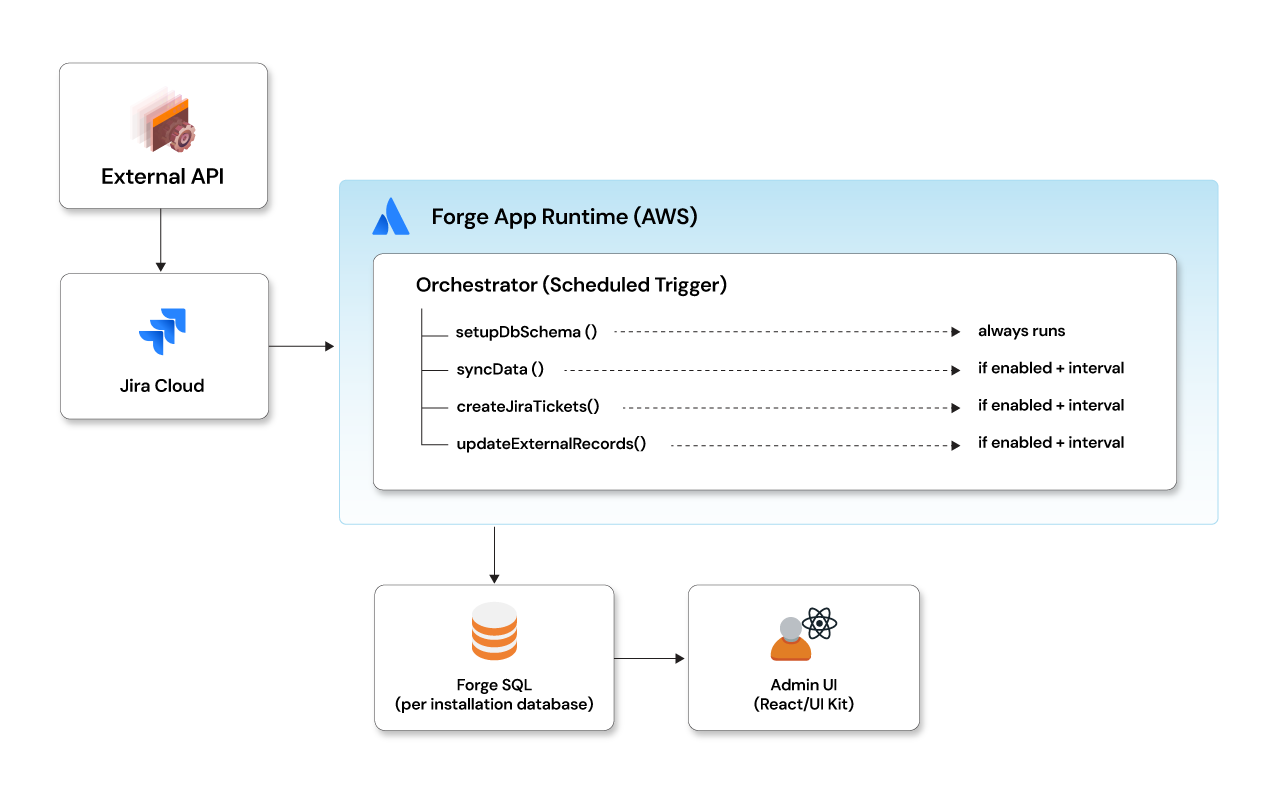
One entry point. Config-driven intervals. Centralised error handling. Easy to debug and extend.
typescript
export async function orchestratorFunction() {
  await setupDbSchema(); // Ensure schema exists on every run

  const config = await getCustomerConfiguration();
  if (!config) return;

  if (config.sync_enabled && intervalElapsed(config.last_sync_at, config.sync_interval)) {
    await syncData();
  }
  if (config.create_tickets_enabled && intervalElapsed(config.last_ticket_at, config.create_tickets_interval)) {
    await createJiraTickets();
  }
  if (config.update_enabled && intervalElapsed(config.last_update_at, config.update_interval)) {
    await updateExternalRecords();
  }
}
Event triggers — reacting to Jira in real time
Event triggers fire in response to Jira Software activity. Declare them in manifest.yml and wire them to handler functions:
yaml
trigger:
  - key: issue-updated
    function: issueUpdatedHandler
    events:
      - avi:jira:updated:issue

typescript
export async function issueUpdatedHandler(event: any) {
  try {
    const issueKey = event.issue.key;
    const newStatus = event.issue.fields.status.name;

    await updateLocalRecord(issueKey, newStatus);
    await syncToExternalSystem(issueKey, newStatus);
  } catch (err) {
    // Never re-throw — Jira retries endlessly on failure,
    // causing duplicate processing and retry storms
    console.error(JSON.stringify({ event: 'sync_failed', error: String(err) }));
  }
}
Rule: Jira event handlers must never throw unhandled errors. Always catch, log, and persist failure state internally.
Timeout limits
Every Forge function context has a hard execution ceiling. Design around these — they are not negotiable:
| Context | Limit |
|---|---|
| Resolver | 25 seconds |
| Webtrigger | 55 seconds |
| Scheduled trigger | 900 seconds (set timeoutSeconds: 900 in manifest) |
Resolvers should orchestrate, not execute. For anything slow, fire async and return immediately:
typescript
resolver.define('startBulkSync', async () => {
  runBulkSync().catch(console.error); // Non-blocking
  return { status: 'started' };
});
Webtriggers — inbound HTTP endpoints
Webtriggers are public HTTPS endpoints with no built-in authentication. You are fully responsible for validation. Always check timestamps to prevent replay attacks and verify HMAC signatures before processing:
typescript
export async function webhookHandler(req: WebTriggerRequest) {
  // Validate timestamp to prevent replay attacks
  const timestamp = req.headers['x-timestamp'];
  if (Math.abs(Date.now() - Number(timestamp)) > 300000) {
    return { statusCode: 401, body: 'Expired request' };
  }

  // Validate HMAC signature
  const signature = req.headers['x-signature-256'];
  if (!isValidHmac(req.body, signature, process.env.WEBHOOK_SECRET)) {
    return { statusCode: 401, body: 'Unauthorized' };
  }

  // Offload heavy work — respond within the timeout window
  processEvent(JSON.parse(req.body)).catch(console.error);

  return { statusCode: 200, body: JSON.stringify({ received: true }) };
}
Resolvers — the frontend/backend bridge
Resolvers are the only sanctioned way for your Custom UI to communicate with Jira APIs, your Forge SQL database, and external services. Keep them thin — validate, delegate, return:
typescript
const resolver = new Resolver();

resolver.define('getConfiguration', async ({ context }) => {
  const config = await getConfig();
  return {
    success: true,
    config: config ? maskSensitiveFields(config) : null
  };
});

resolver.define('saveConfiguration', async ({ payload }) => {
  if (!payload.api_key) return { success: false, error: 'API key required' };
  await saveConfig(payload);
  syncData().catch(console.error); // Kick off sync, don't await
  return { success: true };
});

resolver.define('startBulkSync', async () => {
  runBulkSync().catch(console.error);
  return { status: 'started' };
});

export const handler = resolver.getDefinitions();
Frontend calling resolvers via @forge/bridge:
typescript
import { invoke } from '@forge/bridge';

const { config } = await invoke('getConfiguration');
await invoke('saveConfiguration', { api_key: formValues.key });
await invoke('startBulkSync')
Multi-tenancy — what Forge handles vs what you handle
Forge automatically isolates all hosted storage per installation — Forge SQL, Key-Value Store, Custom Entity Store, and Object Store. This is enforced at the infrastructure level, not in your Node.js function code. Each app installation gets its own dedicated Forge SQL database instance. You do not need installation_id columns in your SQL tables for Forge-managed data to be isolated.
sql
-- Clean schema — no installation_id needed for Forge SQL
CREATE TABLE sample (
  id         BIGINT AUTO_RANDOM PRIMARY KEY,
  issue_key  VARCHAR(255) NOT NULL,
  status     VARCHAR(50),
  created_at TIMESTAMP DEFAULT CURRENT_TIMESTAMP
);
You can still read context.installationId in resolvers for logging, debugging, or audit trails — but it is not required for data isolation within Forge SQL.
External systems are your responsibility
If your Forge app writes to external systems — your own database, Elasticsearch, S3, or a third-party API — you are responsible for tenant isolation there:
typescript
// External system — you must scope by tenant
await externalApi.createRecord({
  installationId: context.installationId,
  issueKey,
  status
});
This is one of the most common gaps in Forge app development. Forge SQL isolation is automatic; everything outside Forge's managed storage is your boundary to enforce.
In Blog 3, we take this app to production — covering security deep dives, real-world challenges, deployment, distribution, and everything that breaks if you don't plan for it.
Forge app development gets significantly harder between "working locally" and "shipped to real customers." Opcito's engineers have built and shipped production Forge apps and are ready to help you navigate the architecture decisions, edge cases, or migration challenges that come with the territory. Talk to the team.
Comments
Related Blog /Articles





Ready to transform your FinTech Application?
Explore our VAPT as a Service portfolio or speak with our team to discuss your security testing requirements.