
 Security Product Engineering
















Kubernetes has become the go-to orchestrator for modern, scalable infrastructure. Consequently, nearly all leading cloud providers, including AWS, offer managed Kubernetes services. One such widely adopted service is Amazon EKS, which enables you to run Kubernetes reliably across on-premises and AWS environments. In this blog, we'll guide you through automating shared storage provisioning using AWS EFS, the EFS CSI Driver, and infrastructure-as-code automation to simplify deployment, enhance scalability, and improve the developer experience.
What is AWS EKS?
Amazon EKS is a fully managed Kubernetes service that allows you to run upstream Kubernetes on AWS with a highly available control plane across multiple AWS Availability Zones. The Amazon Elastic Kubernetes Service can automatically scale and manage infrastructure resource clusters on AWS with Kubernetes.
A lot of organizations deploy applications on EKS clusters. For this, the data needs to be transferred or shared between pods when it comes to multiple replicas of deployments or StatefulSets. For example, if you are deploying multiple replicas of the Jenkins server or WordPress website, you need to have the same storage shared across numerous pods of applications. In some cases, while scaling applications using HPA in deployments, where applications are required to have shared locations for application data across instances, we need shared file systems that can be mounted across AZ, nodes, and pods.
How can we create shared storage on AWS to deploy on EKS?
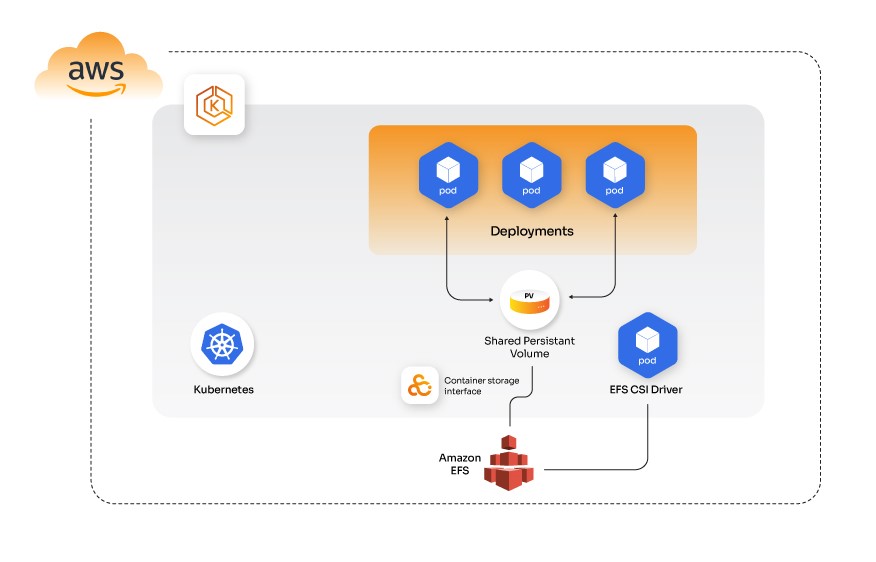
Amazon EFS provides a simple, scalable, fully managed elastic shared file system for Kubernetes. Using Terraform scripts and automation, we can dynamically provision persistent volumes (PVs) and persistent volume claims (PVCs) on EKS, ensuring consistent and scalable storage across AZs.
EFS can also help to make Kubernetes applications scalable and highly available. This is possible because all data written to EFS is written to multiple AWS Availability Zones. Scaled pods can share the same data in case of dependency on the same data across pods.
Ensuring your Kubernetes storage automation is reliable is part of building resilient infrastructure. For similar best practices in Kubernetes workloads, check out our post on KubeVirt to deploy and manage VMs on Kubernetes, where we explore virtualized infrastructure patterns on Kubernetes.
What is an EFS CSI Driver?
Amazon’s EFS Container Storage Interface (CSI) Driver provides a CSI interface that lets Kubernetes clusters that run on AWS to manage the Amazon EFS file systems lifecycle. The EFS CSI Driver supports static and dynamic provisioning of PVs. For static provisioning, the AWS EFS file system needs to be created manually on AWS first. After that, it can be mounted inside a container as a volume using the Driver. On the other hand, dynamic provisioning creates an access point for each PV. Although, there are certain limitations to this.
Limitations for EFS CSI Driver
- The Amazon EFS CSI Driver isn't compatible with Windows-based container images.
- Dynamic, persistent volume provisioning is not supported with Fargate nodes.
Before we move on to the actual deployment automation of shared storage PVs on EKS using AWS EFS and AWS CSI Driver. Let's see what the prerequisites are.
Pre-requisite before configurations
- An existing Amazon EKS cluster
- IAM OIDC provider created and configured for EKS cluster; refer
- Command line tool eksctl installed; to install please refer
- Command line tool kubectl installed; to install please refer
- Command line tool awscli installed; to install please refer
- Command line tool helm installed; to install please refer
Clone Automation repo opcito-blogs/efs-csi-provisioner
git clone git@github.com:opcito-blogs/efs-csi-proCvisioner.git
Create IAM Policy and IAM Role to integrate EFS with EKS
Create an IAM policy and assign it to an IAM role. The policy will allow the Amazon EFS driver to interact with our file system. We have created an automation script that will create an IAM role as part of the automated script. Create an IAM policy that allows the CSI Driver's service account to make calls to AWS APIs on your behalf.
./deploy.sh --action create_role --region <region> --cluster-name <cluster-name>
Example:./deploy.sh --action create_role --region us-east-1 --cluster-name opcito-eks
Create and configure the EFS filesystem using an automation script that runs Terraform infrastructure as a code for automation scripts. This automation script creates an EFS filesystem, security groups, and network access points for EFS to mount in the provided VPC ID and the region specified in the command.
./deploy.sh --action create_efs --efs-name <name> --vpc-id <vpc-xxxxx> --region <region>
Example:./deploy.sh --action create_efs --efs-name opcito-efs --vpc-id vpc-43434344 --region us-east-1
After running this command, it will create an EFS filesystem, providing the output as shown below. Use File System ID to create a storage class later.
##### Use the following information to deploy Storage Class #####
File System ID ====> fs-455555555
Install the EFS CSI Driver on your EKS cluster using the following automation script:
./deploy.sh --action deploy_csi --region <region> --cluster-name <cluster-name>
This deploys a Helm chart into your cluster.
Or you can also use the Helm command to deploy as shown below:
Add Helm Repo
helm repo add aws-efs-csi-driver https://github.com/kubernetes-sigs/aws-efs-csi-driver
Update Helm Repo
helm repo update
Install Release
helm upgrade -i aws-efs-csi-driver aws-efs-csi-driver/aws-efs-csi-driver \ --namespace kube-system \ --set image.repository=602401143452.dkr.ecr.region-code.amazonaws.com/eks/aws-efs-csi-driver \ --set controller.serviceAccount.create=false \ --set controller.serviceAccount.name=efs-csi-controller-sa
Create a Storage Class to create dynamic PVCs.
Create Storage class for EFS in EKS, replace <file-system-id> with EFS ID created above storageclass.yaml
kind: StorageClass
apiVersion: storage.k8s.io/v1
metadata:
  name: efs-sc
provisioner: efs.csi.aws.com
parameters:
  provisioningMode: efs-ap
  fileSystemId: <file-system-id>
  directoryPerms: "700"
  gidRangeStart: "1000" # optional
  gidRangeEnd: "2000" # optional
  basePath: "/dynamic_provisioning" # optional
Kubectl apply -f storageclass.yaml
Use efs-sc storage class to create dynamic PVC using EFS as shown below:
pvc-pod.yaml
---
apiVersion: v1
kind: PersistentVolumeClaim
metadata:
  name: efs-claim
spec:
  accessModes:
    - ReadWriteMany
  storageClassName: efs-sc
  resources:
    requests:
      storage: 5Gi
---
apiVersion: v1
kind: Pod
metadata:
  name: efs-app
spec:
  containers:
    - name: app
      image: centos
      command: ["/bin/sh"]
      args: ["-c", "while true; do echo $(date -u) >> /data/out; sleep 5; done"]
      volumeMounts:
        - name: persistent-storage
          mountPath: /data
  volumes:
    - name: persistent-storage
      persistentVolumeClaim:
        claimName: efs-claim
Kubectl apply -f pvc-pod.yaml
This is how you can use EFS CSI Driver to Mount EFS on EKS as dynamic Persistent Volumes. PVCs can be created to mount EFS as PV in pods using the storage class efs-sc. This creates a new folder for each Persistent Volume inside the EFS root folder. At Opcito, we bring this approach into practice through our Cloud services, helping organizations streamline infrastructure-as-code deployments, storage provisioning, and Kubernetes automation at scale. Get in touch with us to talk to an expert.
Comments
Related Blog /Articles






Ready to transform your FinTech Application?
Explore our VAPT as a Service portfolio or speak with our team to discuss your security testing requirements.