
 Security Product Engineering















In today’s AI era, developers and companies are increasingly building applications that rely on large language models (LLMs) from multiple providers — OpenAI, Anthropic, Google, Azure, and more. The challenge? Each provider has its own API format, key management, billing model, and response patterns. Besides, some LLMs perform better than others in certain cases (e.g., domain-specific workloads), and applications might want to use subject-matter-expert LLMs for different tasks. These complexities make it difficult to scale AI capabilities without a centralized interface.
Enter LiteLLM — a unified LLM API gateway and Python SDK that simplifies how teams connect, manage, observe, and optimize LLM usage across platforms. Whether you're building a multi-tenant SaaS, internal team tools, or enterprise AI services, LiteLLM helps you streamline LLM infrastructure with minimal code change.
What is LiteLLM, and why do developers use it?
LiteLLM is an open-source LLM gateway and proxy that exposes a consistent OpenAI-compatible API over 100+ different LLM providers — including OpenAI, Anthropic, Vertex AI, Azure OpenAI, and more. You or your apps send requests to LiteLLM in a single format, and it routes them behind the scenes to the appropriate model provider.
In simpler terms:
- One API
- Multiple LLM vendors
- Centralized cost tracking
- Per-tenant usage & budgets
- Fallbacks and reliability built-in
- Configurable, policy-driven intelligent routing
Think of it as the "AI gateway" for your entire LLM fleet.
How does LiteLLM work? Architecture explained
LiteLLM has two primary components - Proxy Server (LLM Gateway) and Python SDK:
Proxy Server (LLM Gateway)
- Runs as a service (Docker/Kubernetes/Cloud VM)
- Accepts API calls in OpenAI format (
/v1/chat/completions) - Routes requests to configured providers using provider keys
- Enforces budgets, rate limits & logging
- Provides unified observability
- Supports fallback logic in case of provider failure
Clients don't need to know where the request goes or how to format it for Google vs OpenAI — they just call LiteLLM once.
Python SDK
For developers embedding LLMs directly in apps or scripts:
- Programmatic interface (
litellm.completion(…)) - Supports retries, fallback models, cost tracking, and observability callbacks
- Works with all supported providers without extra boilerplate
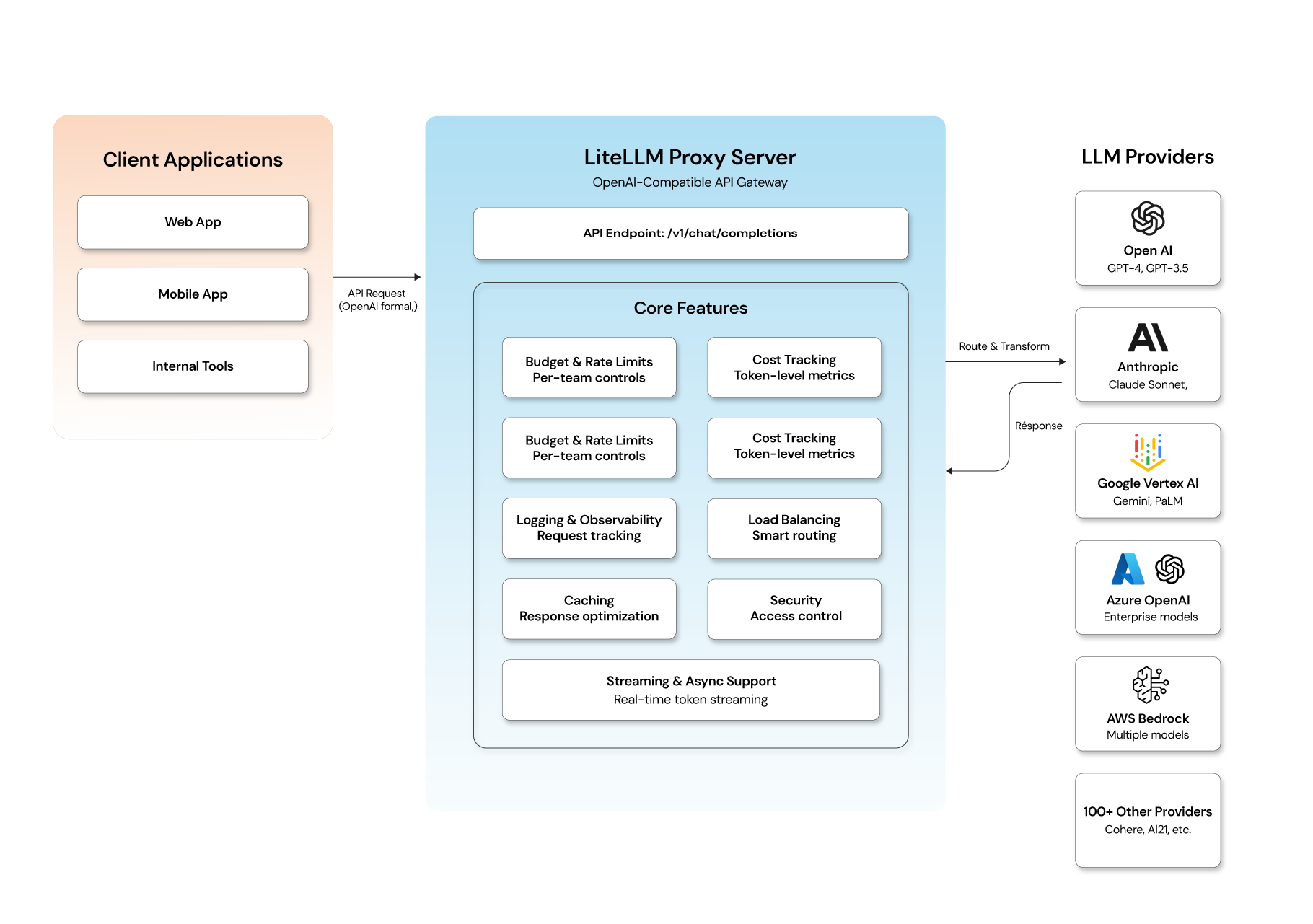
Core features: What makes LiteLLM worth using
Here are the key capabilities that make LiteLLM stand out:
- Unified multi-provider API: One consistent API for all models — eliminates provider-specific code.
- Cost & token tracking: Track exactly how much each team or project spends, down to token usage per request.
- Budgets & rate limits: Set spend caps and request limits per user or team to avoid runaway costs.
- Provider fallbacks: If a model fails or is throttled, LiteLLM can retry with another provider automatically.
- Logging & observability: Logs requests, responses, latency, errors, deployment metrics — integrates with observability tools.
- Virtual keys & access control: Supports per-team or per-user keys, enabling secure multi-tenant environments.
- Streaming & async support: Supports streaming tokens and asynchronous handling for real-time applications.
Key benefits of using a unified LLM gateway
- Zero vendor lock-in: Switch or mix models without changing app logic.
- Enterprise-ready governance: Control budgets and enforce rules across your organization.
- Cost optimization: Route low-value tasks to cheaper models automatically.
- Unified observability: Get detailed logs and insights into usage in one place.
- Ease of onboarding: Developers can start using new models within minutes.
Who is using LiteLLM? Real-world use cases
Here's how organizations use LiteLLM:
- Multi-Tenant SaaS grant each tenant its own keys, budgets, and limits while keeping a single gateway endpoint.
- Internal AI Platforms build an internal LLM platform for teams without repeating integration code for each model provider.
- Cost and Spend Governance MSPs, DevOps, or Finance teams tracking LLM economics across business units.
- On-Premises or Self-Hosted Deployments control your stack completely, without sending traffic outside your infrastructure.
Limitations to know before you deploy LiteLLM in production
- LiteLLM scales well to medium traffic but may need extra architectural support (e.g., optimized logging pipelines) for very high throughput scenarios.
- While LiteLLM provides strong governance and routing, production teams should still plan for observability backends, database sizing, and smart caching.
How to get started with LiteLLM: Step-by-step setup
Step1: Install SDK and install proxy server extras(optional)
# Core SDK
pip install litellm

# With proxy server support
pip install 'litellm[proxy]'
Step 2: Configure provider API keys and budgets
# config.yaml
model_list:
  - model_name: gpt-4o
    litellm_params:
      model: openai/gpt-4o
      api_key: os.environ/OPENAI_API_KEY

  - model_name: claude-sonnet
    litellm_params:
      model: anthropic/claude-sonnet-4-5-20250929
      api_key: os.environ/ANTHROPIC_API_KEY

general_settings:
  master_key: os.environ/LITELLM_MASTER_KEY
  database_url: os.environ/DATABASE_URL
  default_team_settings:
    max_budget: 50.0   # USD per team/month
    budget_duration: 1mo
Step 3: Start the proxy server and test endpoints
# Start the proxy (CLI)
litellm --config config.yaml --port 4000

# Or via Docker
docker run -d \
  -p 4000:4000 \
  -v $(pwd)/config.yaml:/app/config.yaml \
  -e OPENAI_API_KEY=$OPENAI_API_KEY \
  -e ANTHROPIC_API_KEY=$ANTHROPIC_API_KEY \
  ghcr.io/berriai/litellm:main-latest \
  --config /app/config.yaml

import litellm

# Call OpenAI
response = litellm.completion(
    model="gpt-4o",
    messages=[{"role": "user", "content": "Summarize LiteLLM in one line"}]
)

# Switch to Claude — zero other changes
response = litellm.completion(
    model="anthropic/claude-sonnet-4-5-20250929",
    messages=[{"role": "user", "content": "Summarize LiteLLM in one line"}]
)

print(response.choices[0].message.content)
Step 4: Cost calculation and based on that set up monitoring and alerting
import litellm

response = litellm.completion(
    model="gpt-4o",
    messages=[{"role": "user", "content": "Hello"}],
    metadata={"team": "engineering", "project": "search"}
)

# Built-in cost calculation
cost = litellm.completion_cost(completion_response=response)
print(f"Tokens: {response.usage.total_tokens}")
print(f"Cost:   ${cost:.6f}")
Is LiteLLM the right AI gateway for your team?
LiteLLM is a solid solution for teams that want to standardize LLM access across providers, enforce governance, optimize cost, and centralize observability — all through a single API layer. Whether you're a developer, platform engineer, or enterprise architect, LiteLLM makes multi-provider LLM integration cleaner, cheaper, and far more manageable.
That said, getting the most out of LiteLLM in production — especially at scale — requires thoughtful architectural decisions on deployment, observability, security, and model routing. That’s where having the right engineering partner makes the difference.
Building a production-grade GenAI application? Opcito can help.
Integrating LiteLLM is a great starting point, but building a robust, scalable, and secure GenAI application involves much more — model lifecycle management, MLOps pipelines, infrastructure design, and ongoing reliability engineering.
At Opcito, our GenAI App Development team works with organizations to architect and deliver AI-powered applications that are production-ready from day one. From multi-LLM orchestration and MLOps to cloud-native deployment on AWS, Azure, and GCP, we bring deep hands-on expertise across the full GenAI stack.
We've helped startups, ISVs, and enterprises move from proof-of-concept to production-grade AI systems — faster, and without the growing pains that come from figuring it all out alone. If you're evaluating how to build or scale your GenAI infrastructure, let's talk.
Comments
Related Blog /Articles





Ready to transform your FinTech Application?
Explore our VAPT as a Service portfolio or speak with our team to discuss your security testing requirements.