
 Security Product Engineering














Shipping software fast is hard. Shipping it fast without breaking things is even harder. As products grow, test suites become difficult to maintain, pipelines slow down, and flaky UI tests start costing real engineering time.
That is where a well-designed automation framework matters. Not just a set of scripts, but a structure that supports clean test design, reliable execution, and fast debugging when failures happen.
In this blog series, we walk through how to build an enterprise-ready automation framework that supports:
- Page Object Model
- JSON-based test data
- Retry mechanisms
- Allure and HTML reports
- Slack notifications
- GitHub Actions CI/CD pipelines
By the end of this guide, you will have a production-ready framework that supports cross-browser testing, parallel execution, and team-friendly reporting.
What is Playwright?
Playwright is Microsoft’s next-generation automation framework designed for browser, API, and UI testing. It supports modern web applications built using frameworks such as React, Angular, and Vue, and it is designed to handle dynamic content and asynchronous behaviour reliably.
Unlike traditional browser automation tools that rely heavily on external drivers, Playwright communicates directly with browser engines. This gives it better control over browser behaviour, faster execution, and more consistent results.
Key features of Playwright
- Multi-browser support (Chromium, Firefox, WebKit)
- Multi-language bindings (Python, JavaScript, Java, .NET)
- Auto-waiting for elements and network events
- Web-first assertions
- Built-in tracing, video, and screenshot capture
- Test isolation using browser contexts
- Network mocking
- Native API testing support
These features significantly reduce flakiness and make debugging easier, especially when failures occur in CI pipelines.
Comparison btween Playwright and Selenium
Both Playwright and Selenium automate browsers, but their internal architectures are fundamentally different. These differences affect test stability, execution speed, and maintenance effort over time.
| Feature | Playwright | Selenium | Winner |
|---|---|---|---|
| Auto-waiting | Built-in | Manual waits required | Playwright |
| Speeed | Very fast | Slower (legacy protocol) | Playwright |
| Architecture | Single API across browsers | WebDriver dependent | Playwright |
| Trace & Video | Inbuilt | Third-party tools | Playwright |
| Shadow DOM | Supports | Limited | Playwright |
| API Testing | Native | Needs RestAssured/Postman | Playwright |
| Test Isolation | Per test browser/context | Shared session patterns common | Playwright |
| Flakiness | Very low | Medium–High | Playwright |
Why enterprises prefer Playwright over Selenium:
- Lower maintenance
- Fewer flaky tests
- Native modern app support
- Faster CI execution
- Reduced debugging time
Why Python works well for automation
- Simple and readable syntax
- Large library ecosystem
- Strong support for API and async workflows
- Faster onboarding for new team members
Python allows both developers and QA engineers to contribute to automation without steep learning curves.
Why Pytest is suitable for enterprise testing
- Plugin-based architecture
- Powerful fixtures for browser lifecycle management
- Rich reporting integrations
- Native support for markers, retries, and parametrization
- Smooth integration with Playwright
Together, Python and Pytest form an enterprise-grade automation stack that balances ease of use with scalability.
Real-world use cases for Playwright automation
Playwright is widely used across industries where reliability and compliance are critical:
- E-commerce functional testing
- Banking UI validation
- Insurance workflows
- Admin dashboards and portals
- Multi-role authentication flows
- Progressive web apps
- API + UI integrated test flows
Because Playwright supports both API and UI testing, teams can validate complete business workflows instead of testing each layer independently.

High-level framework architecture
modern-Playwright-framework/
  ├── config/
  │    └── config.json
  ├── pages/
  │    └── login_page.py
  ├── tests/
  │    └── test_login_regression.py
  ├── utils/
  │    ├── json_reader.py
  │    └── slack_notify.py
  ├── testdata/
  │    └── login.json
  ├── reports/
  ├── conftest.py
  ├── pytest.ini
  ├── requirements.txt
  └── .github/workflows/Playwright-ci.yml
This structure separates responsibilities clearly, which helps teams scale test coverage without turning the repository into a maintenance problem.
Building the framework structure
You are now moving from concepts into implementation. This section explains how to structure a Playwright Pytest automation framework so it remains maintainable, scalable, and enterprise-ready as test coverage and team size grow.
This framework structure follows proven automation design patterns used in large QA teams to support parallel execution, CI/CD integration, and long-term test stability.
Folder structure explained
project/
  ├── config/         → Environment configs
  ├── pages/          → Page Object Model classes
  ├── tests/          → Test suites
  ├── utils/          → Reusable utilities
  ├── testdata/       → JSON test data
  ├── reports/        → HTML/Allure reports
  ├── conftest.py     → Pytest fixtures
  ├── pytest.ini      → Test configuration
  └── requirements.txt
Why this structure works
- Separation of concerns
- Scalable for 500+ test cases
- Team collaboration enabled
- Reduces code duplication
This layout also aligns well with standard enterprise automation guidelines.
Page Object Model (POM)
The Page Object Model enforces separation between UI interaction logic and test validation logic. UI actions are wrapped inside page classes instead of being written directly in test files.
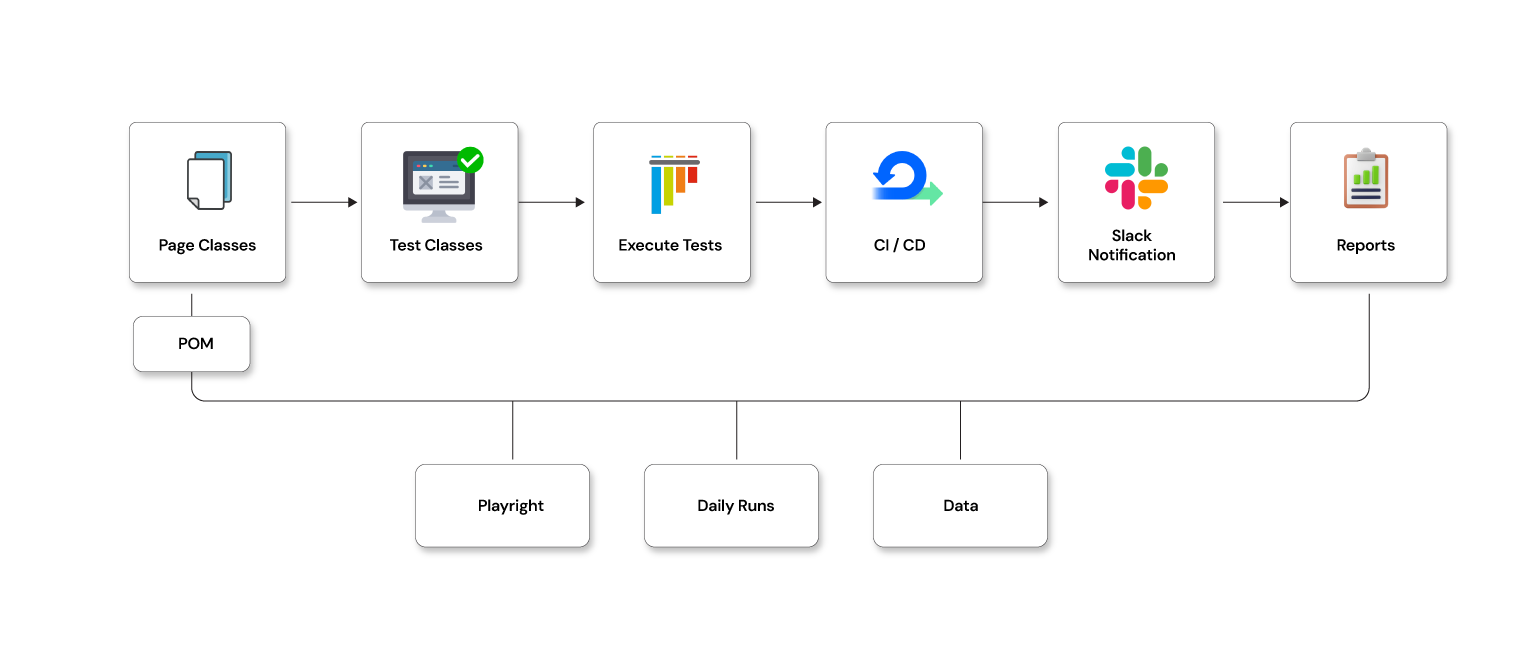
Why POM works well with Playwright?
- Keeps test scripts short and readable
- Centralizes locator updates
- Encapsulates business workflows
- Makes UI changes easier to manage
This reduces the ripple effect of UI updates across the test suite.
Locators as global constants
Selectors should not be scattered across test files.
Best practices:
- Avoid raw locators inside tests
- Define locators as reusable constants in page classes
- Keep selector changes localized
Example:
USERNAME_INPUT = "#username"
PASSWORD_INPUT = "#password"
LOGIN_BUTTON   = "//button[text()='Login']"
Config file for environment management
config/config.json
{
  "base_url": "https://demo-app.com",
  "env": "qa"
}
Using a centralized config file allows the same test suite to run across environments without modifying code.
JSON test data handling
testdata/login.json
{
  "valid_user": {
    "username": "admin@test.com",
    "password": "Admin@123"
  }
}
Utility to load test data:
class JSONReader:
    @staticmethod
    def load_json(path):
        import json
        with open(path) as f:
            return json.load(f)
Separating test data from logic allows business inputs to change independently from automation code.
LoginPage POM example
pages/login_page.py
from Playwright.sync_api import Page

class LoginPage:

    USERNAME = "#username"
    PASSWORD = "#password"
    LOGIN_BTN = "button[type='submit']"

    def __init__(self, page: Page):
        self.page = page

    def login(self, username, password):
        self.page.fill(self.USERNAME, username)
        self.page.fill(self.PASSWORD, password)
        self.page.click(self.LOGIN_BTN)
        self.page.wait_for_url("**/dashboard")
This page object exposes business actions instead of raw UI commands, which keeps tests focused on outcomes.
Writing & executing tests
This section focuses on converting your framework into working test suites, showing how Playwright and Pytest work together to create reliable, readable, and repeatable automated test cases.
Creating Pytest test cases
tests/test_login_regression.py

import pytest
from utils.json_reader import JSONReader
from pages.login_page import LoginPage

@pytest.mark.regression
def test_valid_login(setup):
    page = setup
    data = JSONReader.load_json("testdata/login.json")["valid_user"]

    login = LoginPage(page)
    login.login(data["username"], data["password"])

    assert "dashboard" in page.url, "Login failed!"
This test reads like a business scenario instead of a sequence of UI commands.
Pytest markers
pytest.ini

[pytest]
markers =
  regression: Regression Test Suite
  smoke: Smoke Test Suite

addopts = --reruns 2 --html=reports/report.html --self-contained-html
Markers allow selective execution based on pipeline stage or risk level.
Retry mechanism
Enabled through:
pytest --reruns 2 --reruns-delay 3
Retries help stabilize pipelines affected by temporary network or infrastructure delays.
End-to-end login example
The flow validates:
- Navigation
- Test data loading
- POM interaction
- Assertions
- Reporting
- Screenshots
The entire workflow is validated using Playwright’s stable browser automation.
Allure + HTML Reports
Install:
pip install allure-pytest pytest-html
Execute:
pytest --alluredir=allure-results
allure serve allure-results
Reports provide visibility for both technical and non-technical stakeholders.
Screenshots and tracing on failure
Inside conftest.py:
if request.node.rep_call.failed:
    page.screenshot(path=f"reports/{request.node.name}.png")
Tracing:
page.context.tracing.start()
page.context.tracing.stop(path="trace.zip")
Parallel test execution
Pytest:
pytest -n 4
Playwright’s isolated browser contexts allow safe parallel execution without shared state issues.
CI/CD + Slack notification integration
Automation only delivers real value when it runs consistently in CI/CD pipelines and shares results with the team. This section shows how to integrate your Playwright Pytest framework with GitHub Actions and push execution updates directly to Slack.
Github actions workflow
.github/workflows/Playwright-ci.yml

name: Playwright Automation

on:
  push:
    branches: [ main ]

jobs:
  test:
    runs-on: ubuntu-latest
    steps:
      - uses: actions/checkout@v3

      - name: Install Python
        uses: actions/setup-python@v4
        with:
          python-version: "3.10"

      - name: Install dependencies
        run: |
          pip install -r requirements.txt
          Playwright install

      - name: Run Tests
        run: pytest --alluredir=allure-results

      - name: Upload Report Artifact
        uses: actions/upload-artifact@v3
        with:
          name: allure-results
          path: allure-results

      - name: Notify Slack
        run: python utils/slack_notify.py
        env:
          SLACK_WEBHOOK: ${{ secrets.SLACK_WEBHOOK }}
This ensures automated validation on every push to the main branch.
Slack notification integration
utils/slack_notify.py
import requests
import json
import os

def send_message(text):
    url = os.getenv("SLACK_WEBHOOK")
    payload = {"text": text}
    requests.post(url, data=json.dumps(payload))

if __name__ == "__main__":
    send_message("Playwright Test Execution Completed. Reports Uploaded!")
Notifications keep the team informed without manual monitoring of pipelines.
Sharing summary + report link
Slack notification includes:
- Total tests executed
- Passed and failed counts
- Report link
- Execution duration
This allows quick assessment of build health.
Best practices for scaling automation
- Maintain locator versioning
- Introduce service-layer testing
- Use test tags for grouping
- Prevent duplicate test coverage
- Run smoke tests on every pull request
- Schedule full regression runs nightly
Scaling automation is as much about discipline as it is about tooling.
Future enhancements
Potential next steps include:
- Dockerized execution
- Hybrid API and UI workflows
- Integration with BrowserStack or Sauce Labs
- Failure trend analysis and clustering
Next steps in your Playwright and pytest automation journey
This series continues with two upcoming deep-dive blogs that focus on advanced testing scenarios:
• Using Playwright for GenAI application testing
• End-to-end MCP server application testing using Playwright + Pytest + Python with Slack integration
If your team is looking to modernize automation, improve pipeline reliability, or scale test coverage without increasing maintenance overhead, Opcito’s experts are here to help. Contact us for support in designing and implementing automation frameworks that align with your product architecture and delivery goals.
Comments
Related Blog /Articles





Ready to transform your FinTech Application?
Explore our VAPT as a Service portfolio or speak with our team to discuss your security testing requirements.