
 Security Product Engineering















Many organizations try using general-purpose AI tools like GPT for industry-specific tasks, only to run into the same issue. The responses feel generic and lack the internal context that teams depend on. These models are built for broad use cases, not for the specific challenges within your domain.
The move toward domain-specific AI solves this gap. Companies are beginning to convert their own documentation, processes, and data into custom AI engines that actually understand their work.
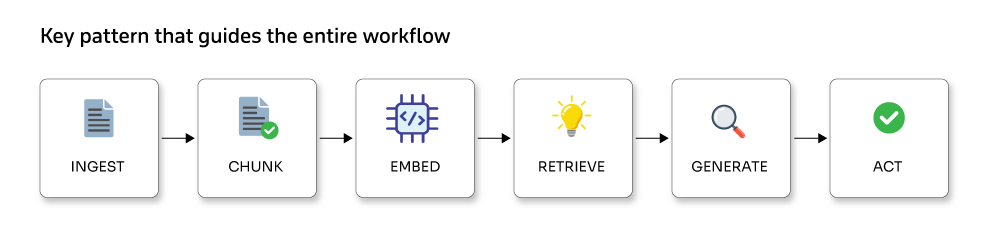
This is not a passing trend. It is a deeper shift in how teams operate, make decisions, and deliver results. At the heart of every dependable domain-specific AI system is a simple pattern that guides the entire workflow:
What are domain-specific AI assistants?
Domain-specific AI assistants combine large language models with a grounded knowledge base to provide accurate, context-aware responses across fields such as healthcare, finance, law, and customer support.
If you have ever wished for an AI that truly understands your industry rather than repeating buzzwords, you are imagining a domain-specific assistant. Generic chatbots offer broad answers. Domain-specific assistants behave more like seasoned experts who have spent years inside your environment.
What separates them from general tools is their deep familiarity with the realities of your industry. They understand the terminology, compliance rules, workflows, and even the everyday frustrations your team deals with. A healthcare-focused assistant, for example, does more than identify medical terms. It understands HIPAA requirements, insurance processes, and diagnostic patterns that a general model often misses.
This is the strength of vertical AI. Instead of trying to support every industry at once, these assistants focus on one domain and solve its most specific and demanding problems. They are built on real data from that field and learn the patterns that matter to you, rather than those that matter to the world at large.
Who this blog is for and why it matters
If you are a Python developer, ML engineer, or part of a team working on AI products, this article is for you. Many companies have found that a simple chatbot is not enough. What they need are assistants who can:
- Understand the documents their business depends on
- Interact with internal tools and APIs
- Provide verifiable answers, not just guesses
- Speak the language of their industry
This shift is changing how organizations approach AI.
RAG: The real power behind domain-focused AI assistants
Retrieval-Augmented Generation (RAG) ensures your AI provides reliable, evidence-based answers. Instead of guessing, it pulls information from trusted sources and mixes it with the reasoning power of a large language model. With RAG, an assistant can:
- Look up relevant information from internal files, knowledge bases, and APIs
- Combine that information with LLM reasoning
- Produce accurate answers grounded in real data
- Show the source of each answer
This gives the AI both context and accountability, which are essential in domains such as healthcare, finance, manufacturing, and enterprise IT.
Why it matters today
Organizations want AI that supports real operations. They need automation that aligns with internal processes and reduces risk. A domain-specific assistant powered by RAG can:
- Understand company-specific details
- Follow business rules
- Use existing systems and APIs
- Deliver answers grounded in verified data
RAG turns a general-purpose model into an AI trained on your organization’s world, not just the internet.
Architecture overview
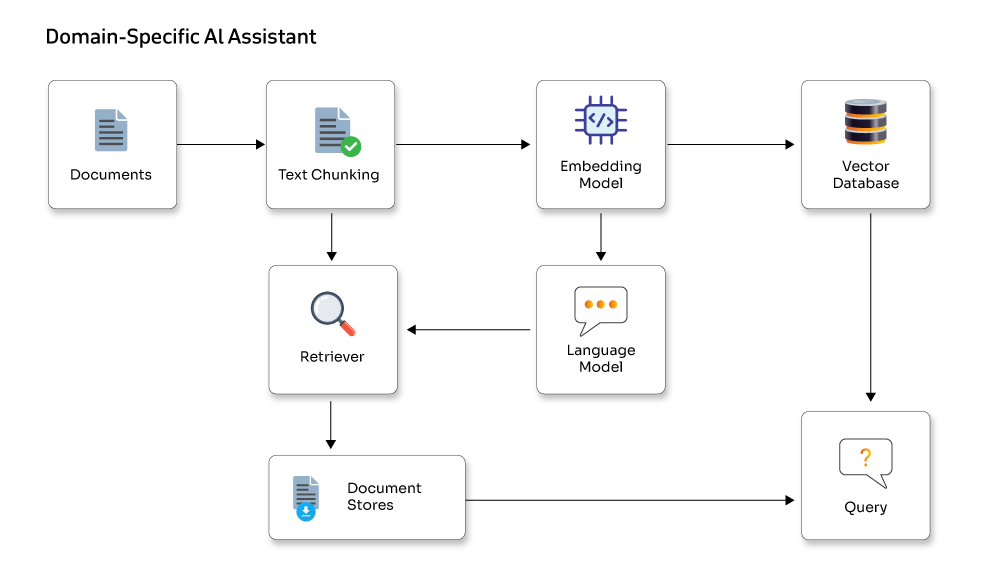
Core components of a domain-specific AI assistant
These components work together to turn raw organizational data into a smart, reliable assistant. Each layer plays a critical role in ensuring the AI understands your domain, retrieves the right information, and delivers accurate responses.
- Ingestion layer: Collects all organizational knowledge from documents, wikis, APIs, databases, Slack channels, cloud storage, and more to serve as the assistant’s source material.
- Preprocessing and chunking: Cleans, normalizes, and breaks data into meaningful chunks. Adds metadata like source, timestamps, author, and version for traceability and verification.
- Embedding engine: Converts chunks into vector embeddings using models like OpenAI Embeddings or Sentence Transformers. Embeddings capture semantic meaning for accurate retrieval.
- Vector database / index: Stores embeddings in vector stores like Pinecone, Redis, Chroma, FAISS, or Weaviate. Serves as the assistant's searchable knowledge base.
- Retriever and re-ranker pipeline: Finds relevant chunks from the vector index and optionally re-ranks them for precise context before sending them to the LLM.
- LLM reasoning layer: Processes the retrieved context with instructions to generate grounded, context-aware responses instead of hallucinations.
- Memory system: Stores short-term conversation history and long-term information like user preferences or past actions to ensure consistent, personalized interactions.
- Tools and action layer: Executes tasks such as database queries, scheduling, document retrieval, and workflow triggers, all within controlled and safe interfaces.
- Monitoring, governance, and safety: Tracks reliability with hallucination detection, citation checks, rate limits, privacy rules, and audit logs to ensure safe enterprise use.
Detailed walkthrough of building a domain-specific AI assistant
This section breaks down each step so you can see how all the pieces fit together.
1. Ingestion: Gathering the information your assistant needs
- The first step is bringing all your domain knowledge together. This can include:
- Product guides, FAQs, policy documents in PDF, Word, or text format
- Support conversations, ticket logs, email threads, and Slack messages
- Internal knowledge hubs such as Confluence, Notion, or Google Drive
- Structured data from SQL databases, CRM tools, or HR systems
Tips for effective ingestion:
- Track the source, date, and author of each file
- Convert all content into a consistent, clean text format (OCR scanned PDFs, extract from DOCX, remove artifacts)
Example: Loading documents in Python with Lang-Chain
# --- Config ---
DATA_DIR = "./data"
DB_DIR = "./db"

# --- Load files from given directory ---
print("Loading documents...")
loader = DirectoryLoader(DATA_DIR, glob="**/*.*")
docs = loader.load()
print(f"Loaded {len(docs)} documents.")
2. Preprocessing & chunking: preparing your data for retrieval
This step ensures your documents are structured so the assistant can understand and access them efficiently.
Once your raw documents are loaded, the next step is to break them into smaller, model-friendly pieces. This stage involves cleaning the text, splitting it into meaningful chunks, and attaching useful metadata, so the system knows where each piece came from.
Example: preprocessing and chunking using the LangChain text splitter
# Create a splitter that keeps chunks readable while maintaining context
# --- Split docs ---
print("Splitting documents...")
splitter = RecursiveCharacterTextSplitter(chunk_size=800, chunk_overlap=150)
chunks = splitter.split_documents(docs)
print(f"Generated {len(chunks)} chunks.")

# Example of enriching each chunk with consistent metadata
for c in chunks:
    c.metadata.setdefault("source", "policy_manual")
    c.metadata.setdefault("version", "v1.2")
How to choose chunking parameters:
- Aim for chunk sizes between 500 and 1500 tokens, depending on how much context your model can handle.
- Overlap chunks by 100 to 300 tokens so important connecting information isn’t lost.
- Split content at natural boundaries like paragraphs or headings to keep chunks coherent.
Proper chunking is essential because it improves retrieval accuracy and minimizes hallucinations later in the pipeline.
3. Generating embeddings and building the vector store
After cleaning and chunking your documents, convert them into numerical embeddings. These embeddings act like searchable fingerprints, letting your assistant quickly locate the most relevant information. The effectiveness of your retrieval pipeline depends on how well embeddings capture the meaning of your content.
Choosing the right embedding model and vector database
Your choice depends on cost, data sensitivity, and performance:
Embedding models
- OpenAI Embeddings: cloud-hosted, highly accurate, ideal for strong semantic understanding
- SentenceTransformers: runs locally, saves API costs, keeps data on-premise
Vector stores
- Chroma: lightweight, perfect for prototyping or local experiments
- Pinecone: managed, scalable, production-ready
- Redis: low-latency, real-time applications
- Weaviate: feature-rich, supports hybrid search (vector + keyword).
Example: Using Chroma with OpenAI embeddings
from langchain_openai import OpenAIEmbeddings

DB_DIR = "./db"
# --- Embeddings ---
emb = OpenAIEmbeddings()

# --- Initialize Chroma ---
vectordb = Chroma(
persist_directory=DB_DIR,
embedding_function=emb
)

# --- Avoid duplicate ingestion ---
existing_count = len(vectordb.get()["ids"])
print(f"Existing chunks in DB: {existing_count}")

if existing_count == 0:
    print("Adding new chunks to DB...")
    vectordb.add_documents(chunks)
    print("Index built & saved successfully!")
else:
    print("Database already has data. Skipping re-ingestion.")
This converts chunks into embeddings and stores them in a Chroma collection. The assistant can then perform similarity searches in milliseconds, even across thousands of documents.
Why metadata matters (Filtering, Namespaces, Access Control)
Alongside your text, you should attach metadata such as:
- document source (e.g., “policy_manual”)
- publishing date or version
- author
- department or category
- language or region
These attributes become powerful filters. For example:
- Retrieve only billing-related documents
- Ignore outdated versions
- Restrict access based on user permissions
Proper metadata makes your assistant smarter, faster, and more reliable for enterprise use cases. This is evident in the 2nd example, where metadata for each chunk is updated.
4. Retriever strategies
Retrievers fetch the most relevant documents from your knowledge base. Common strategies include:
- Flat k-NN: simple and fast, retrieves the top k similar documents; works for most use cases
- Cross-encoder reranking: scores candidates more accurately by considering query and document together; computationally heavier but refines top-k results
- Hybrid: combines keyword search for high recall with semantic embeddings for high precision; ideal when both exact matches and context matter
LangChain example with optional reranker:
emb = OpenAIEmbeddings()

vectordb = Chroma(
persist_directory="./db",
embedding_function=emb
)

retriever = vectordb.as_retriever(search_kwargs={"k": 4})

# Optional: rerank top results for higher accuracy
# reranker = CrossEncoderReranker(model_name="cross-encoder/ms-marco-MiniLM-L-6-v2")
# retriever = ContextualCompressionRetriever(base_compressor=reranker, base_retriever=retriever)
Explanation:
- as_retriever(k=4) fetches the top 4 candidates.
- Reranking improves result order for precision without slowing initial retrieval.
5. QA chains and system prompts
When building a question-answering system, designing system prompts carefully is essential. Keep the system prompt consistent and immutable. Place user queries and retrieved documents in separate sections to prevent mixing instructions with dynamic content.
Example: Simple RetrievalQA using LangChain
# Use the same retriever from your Chroma instance
retriever = vectordb.as_retriever(search_kwargs={"k": 4})

llm = ChatOpenAI(temperature=0)

qa = RetrievalQA.from_chain_type(
    llm=llm,
    chain_type="stuff",
    retriever=retriever
)

print(qa.run("How do I issue a refund for an international order?"))
Explanation:
- ChatOpenAI(temperature=0) ensures consistent, less random answers
- RetrievalQA.from_chain_type links the LLM with your retriever to fetch relevant documents before answering
- Separating user input and retrieved context keeps the model focused without altering system instructions
Prompt engineering tips:
- Give clear instructions for format, style, and response length
- Include a “don’t hallucinate” directive so the model responds with “I don’t know” if unsure
- Return sources or citations using top-k document retrieval with offsets
6. Memory and multi-turn conversations
Memory allows conversational AI to remember previous interactions, making multi-turn conversations more coherent. LangChain offers several memory strategies:
- ConversationBufferMemory: Stores recent messages for short-term context, ideal for ongoing sessions
- ConversationSummaryMemory: Compresses long conversations into summaries to maintain context without growing memory indefinitely
- Custom Persistent Memory: Stores conversation data in a database, allowing continuity across sessions
Example: Using ConversationBufferMemory
# Initialize memory for chat history
memory = ConversationBufferMemory(memory_key="chat_history", return_messages=True)

# LLM
llm = ChatOpenAI(temperature=0)

# Attach memory to the RetrievalQA chain
qa = RetrievalQA.from_chain_type(llm=llm, chain_type="stuff", retriever=retriever, memory=memory)
Best practices:
- Limit memory size to prevent performance issues and use summarization for long conversations.
- Store sensitive information like user preferences separately to ensure privacy and compliance.
- Use memory judiciously to balance context retention with efficiency.
7. Tools and safe action execution
Integrating external tools lets AI agents perform useful actions. Common types include:
- Database query tools: Usually read-only to prevent unintended changes
- Calendar/booking tools: Require user authentication and confirmation before scheduling
- Code execution tools: Run code in a sandboxed environment for safety
Best practices for safe tool usage:
- Tool gating: Require explicit user verification for actions with side effects.
- Allowlist endpoints: Only allow known, safe endpoints to be called.
- Audit logs: Record all tool usage in audit logs for accountability.
Example: Integrating a read-only tool with LangChain
# LLM (same model used in app.py)
llm = ChatOpenAI(temperature=0)
# --- Define a safe business function ---
def query_orders(order_id: str):
    return f"Order {order_id} status: Delivered successfully."

# --- Wrap the function as a LangChain Tool ---
order_tool = Tool(name="query_orders", func=query_orders, description="Use this to get the status of an order by ID."
)

# --- Initialize the Agent with the tool ---
agent = initialize_agent(tools=[order_tool], llm=llm, agent=AgentType.ZERO_SHOT_REACT_DESCRIPTION, verbose=True
)

# --- Example usage (you can call this anywhere) ---
# response = agent.run("Check the status for order 12345")
# print(response)
Explanation:
- query_orders is read-only to prevent unintended changes
- Tool wraps the function for safe integration with the AI agent
- initialize_agent links the tool with the LLM to perform actions safely
8. Safety, privacy & compliance
Building AI systems requires strict attention to safety, privacy, and regulatory rules:
- Access controls: Restrict vector database and API access using tokens and role-based permissions so only authorized users can query or modify sensitive data.
- PII handling: Redact or encrypt personally identifiable information such as user tokens or personal data, and log all access to monitor usage.
- Audit trails: Keep records of user queries, retrieved sources, and LLM outputs to support compliance and accountability.
- Data retention: Set clear policies on how long conversation logs and embeddings are stored and avoid unnecessary data accumulation.
- Regulatory compliance: Follow standards relevant to your domain, such as HIPAA, GDPR, or other regional regulations.
Explanation:
These practices protect users, prevent misuse, and make your AI system auditable and legally compliant.
9. Evaluation and testing
Track both quantitative and qualitative metrics to ensure your system performs reliably:
Metrics to monitor:
- Accuracy on labeled test datasets
- Hallucination rate using manual or automated checks
- Latency and cost per query
- User satisfaction, such as NPS or task completion rates
Testing strategies:
- Unit tests: Verify ingestion, preprocessing, and chunking of documents
- Integration tests: Check retrieval quality and end-to-end query responses
- Synthetic/adversarial tests: Introduce noisy or malicious inputs to evaluate robustness
Explanation:
Regular evaluation keeps your AI system accurate, reliable, cost-effective, and resilient. Combining automated tests with user feedback provides a complete picture of performance.
10. Deployment and scaling
Moving from development to production requires adjustments in infrastructure based on scale:
Prototype / Small-scale:
- Use Chroma locally for vector storage
- Connect to OpenAI for embeddings and LLM queries to keep costs low
Production / Large-scale:
- Use scalable vector stores like Pinecone, Redis, or Weaviate
- Host LLMs via managed services or self-hosted models such as LLaMA
Deployment Example: Docker + FastAPI
Dockerfile:
FROM python:3.11-slim
WORKDIR /app
COPY requirements.txt ./
RUN pip install -r requirements.txt
COPY . /app
CMD [“uvicorn”, “app:app”, “–host”, “0.0.0.0”, “–port”, “8080”]
Scaling Tips:
- Cache embeddings for repeated queries to reduce latency and cost.
- Use async endpoints and background batching for efficient embedding generation.
- Autoscale inference layer with GPU workers when hosting local LLMs.
11. Cost optimization
Efficient use of embeddings and LLMs helps control expenses:
- Cache recent embeddings and retrieval results
- Use smaller embedding models for routine queries and upscale for high-value queries
- Limit k (number of retrieved documents) and reranking frequency
- Batch embedding requests wherever possible
12. Observability and monitoring
Keep an eye on system performance and output quality to ensure reliability:
- Track query latency across percentiles to spot slow responses
- Monitor errors and exceptions for faster debugging
- Detect hallucinations with heuristic or automated checks
- Track source usage to see which documents are queried most frequently
Following these practices ensures your QA system stays scalable, cost-effective, and reliable while minimizing the risk of inaccurate outputs.
Appendix: Design patterns and additional considerations
Below are additional patterns and considerations that strengthen real-world RAG implementations.
RAG (Retrieval-Augmented Generation) Patterns
- Single-Prompt RAG: Retrieve the top-k relevant documents and directly include them in the model’s prompt for answering. Simple and effective for many use cases.
- Chunk + Map-Reduce: Split documents into chunks, generate partial answers for each chunk (map), then combine them into a final response (reduce). Useful for large documents or multi-step reasoning.
- Retrieval with Citations: Retrieve relevant passages along with their source offsets or metadata, allowing the model to provide answers with clear references.
Personalization and long-term memory
- Represent user profiles as embeddings to deliver personalized responses.
- Ensure privacy by using secure, opt-in tokens and avoiding storage of sensitive personal information without consent.
Security checklist (Concise)
- Rotate API keys regularly and protect vector database endpoints.
- Sanitize any files or inputs provided by users to prevent malicious content.
- Require explicit user confirmation before performing actions with side effects.
- Conduct red-team exercises, prompt injection tests, and adversarial scenarios to validate system safety.
These design patterns and security practices help build scalable, reliable, and user-focused AI systems while ensuring privacy, compliance, and robustness.
Sample running code with an example.
Contact Opcito at contact@opcito.com for more details
Example docs.
refund_policy.txt
“Our company allows refunds within 30 days of purchase. International orders may take longer. Contact support for processing.”
shipping_info.txt
“Domestic shipping usually takes 3-5 business days. International shipping may take 10-15 days, depending on customs.”
product_specs.txt
“Product X is a smart speaker with 20W output, Bluetooth 5.2, and Wi-Fi connectivity.
Product Y is a noise-cancelling headphone with 30 hours of battery life.”
Running code
Step-1 :
python ingest_and_build_index.py
Output:
Loaded 3 documents
Created 5 text chunks
Index built and persisted successfully
Step-2:
uvicorn app:app --reload
Example queries and expected outputs
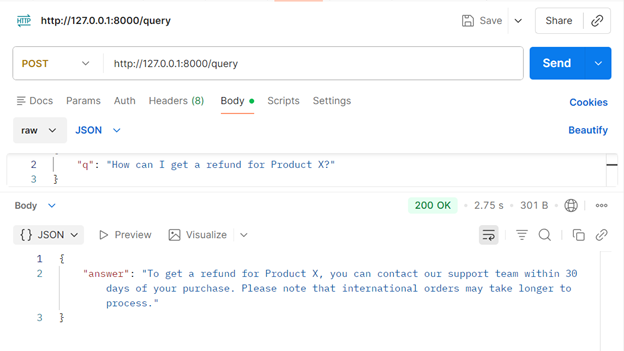
POST http://127.0.0.1:8000/query
Body: {“q”: “How can I get a refund for Product X?”}
Output:
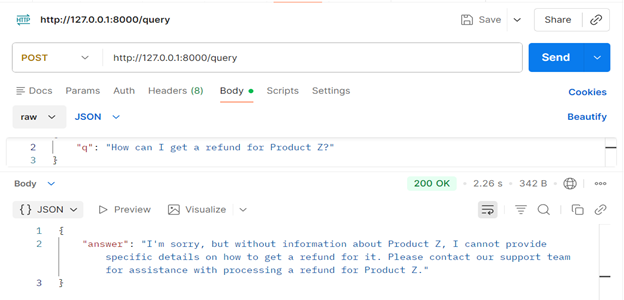
When a user asks something unrelated to the assistant’s domain, it doesn’t hallucinate. It responds clearly and formally, stating that the question falls outside its scope.
Bring it all together.
Putting together a solid domain-specific assistant takes patience. You make sure the data is clean, the retrieval is sharp, and the system behaves safely. None of it is magic. It is steady work that pays off when the assistant finally starts giving answers you can trust.
If you want help building something reliable without burning time on trial and error, Opcito’s experts do this every day. Reach out at contact@opcito.com, and we can walk you through it.
Comments
Related Blog /Articles





Ready to transform your FinTech Application?
Explore our VAPT as a Service portfolio or speak with our team to discuss your security testing requirements.