
 Security Product Engineering















Modern software delivery requires fast feedback loops, reliable automation, transparent reporting, and business visibility. This guide shows how to set up end-to-end GitHub Actions test automation directly from your repository, from understanding the basics of what is GitHub Actions to building enterprise-grade systems.
GitHub actions workflow: Understanding how tests trigger automatically
GitHub Actions workflows are the foundation of automated testing. When code is pushed, they respond automatically. When pull requests are opened, they validate immediately. This automatic response is what makes continuous integration work. Understanding how GitHub action workflow triggering works is essential before building anything complex.
Git webhooks: How GitHub actions workflows trigger
A webhook is an HTTP callback triggered by repository events such as push, pull_request, release, or workflow_dispatch (manual trigger). GitHub sends an event payload to the GitHub Actions runner, which triggers your workflow. This is the mechanism that powers GitHub workflow automation — every event in your repository becomes a trigger point for automation.
GitHub Actions workflows listen to these events continuously. Every push, pull request, or manual trigger becomes an opportunity to run tests automatically. This eliminates manual steps and keeps testing synchronized with code changes.
Architecture Overview:
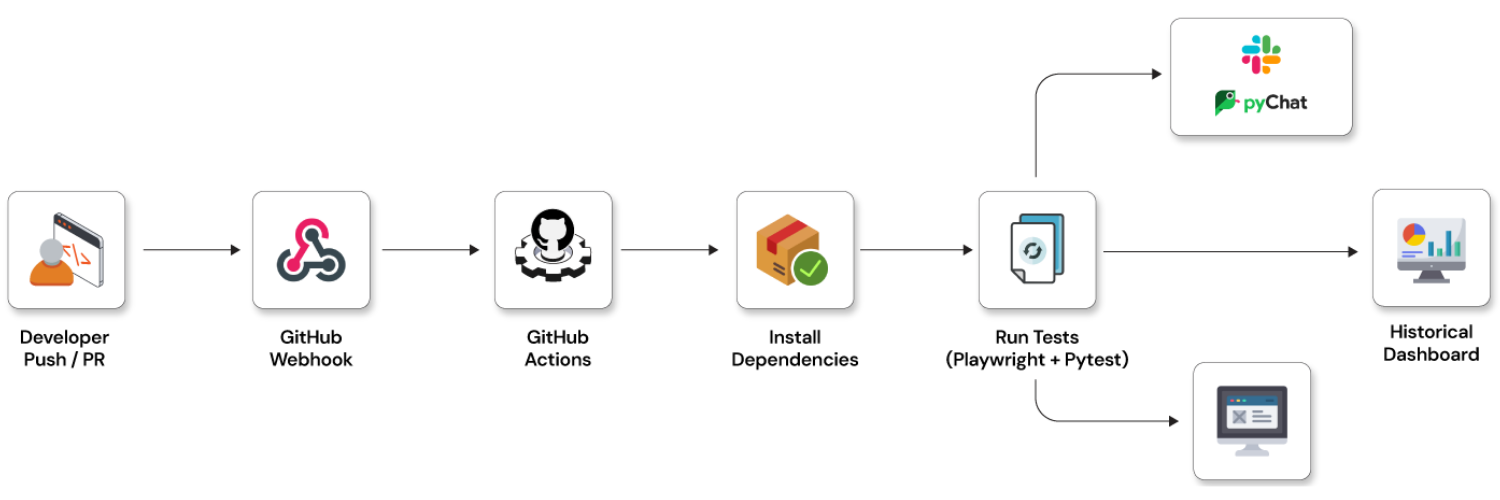
Example workflow trigger
name: CI-Test-Automation

on:
  push:
    branches:
      - main
      - develop
  pull_request:
    branches:
      - main
  workflow_dispatch:
This GitHub action workflow means:
- Every push to
mainordeveloptriggers automation. - Every PR to
mainruns tests. - Can manually trigger from GitHub UI.
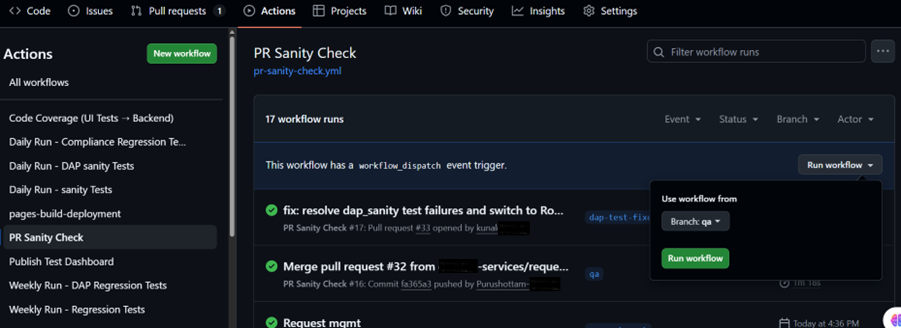
Setting up your GitHub actions CI/CD pipeline for testing
Building a GitHub Actions CI/CD pipeline requires understanding the complete workflow structure. The pipeline orchestrates multiple steps: checkout code, install dependencies, run tests, report results, and notify the team. Each step contributes to the goal of catching bugs before they reach production.
Creating a complete test automation workflow with GitHub actions (Pytest + Playwright)
Practical implementation requires choosing your tech stack. This example uses Pytest + Playwright — a common choice for GitHub Actions for CI CD pipelines that need browser automation.
Create: .github/workflows/test.yml with this complete workflow structure:
name: Test Automation Pipeline

on:
  push:
    branches: [ main ]
  pull_request:

jobs:
  test:
    runs-on: ubuntu-latest
    strategy:
      matrix:
        python-version: [ '3.10' ]

    steps:
    # 1. Checks out your repository's code
    - name: Checkout repository
      uses: actions/checkout@v4

    # 2. Sets up the specified version of Python
    - name: Set up Python ${{ matrix.python-version }}
      uses: actions/setup-python@v5
      with:
        python-version: ${{ matrix.python-version }}

    # 3. Installs your project dependencies from requirements.txt
    - name: Install dependencies
      run: |
        python -m pip install --upgrade pip
        pip install -r requirements.txt

    # 4. Installs the browser binaries needed by Playwright
    - name: Install Playwright Browsers
      run: |
        playwright install --with-deps

    # 5. Run Pytest and generate Robot Framework report, continue on failure
    - name: Run Pytest
      run: pytest -m sanity | tee pytest-summary.txt || true
This structure is one of the best GitHub Actions patterns for GitHub Actions test automation. Each step handles a specific responsibility, making the workflow maintainable and easy to debug.
Structured test reporting with GitHub actions
Test execution is only the beginning. Without proper reporting, test results get buried in logs and developers miss failures. Structured reporting makes test results visible, actionable, and integrated into your development workflow. This is why reporting tools are essential in any GitHub Actions for CI CD pipeline.
dorny/test-reporter: Publishing test results to pull requests
GitHub Actions shows logs by default, but not structured test results. The dorny/test-reporter action changes this by parsing test output and displaying results directly in pull requests where developers see them immediately. This is one of the best GitHub Actions practices for GitHub Actions CI/CD pipeline development.
dorny/test-reporter handles multiple formats: JUnit, Jest, Mocha, PyTest, NUnit, TRX. Whatever testing framework you use, test-reporter can parse and display the results.
Example Integration:
     - name: Publish Test Report
        uses: dorny/test-reporter@v1
        if: always()
        with:
          name: Jest Tests
          path: junit.xml
          reporter: jest-junit
What appears in your pull request:
- Passed test count
- Failed test count
- Total execution time
- Inline failure details
This transforms your GitHub Actions CI/CD pipeline from a black box that shows pass/fail into a transparent system where every test result is visible and linked to specific code.
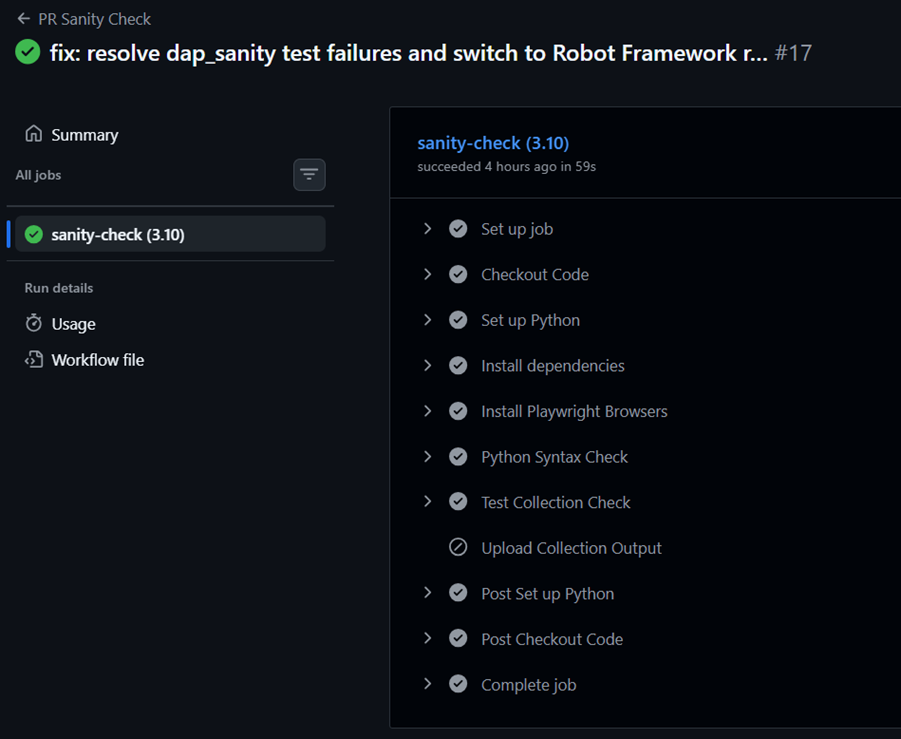
GitHub actions notification flow: Alerting your team
A GitHub Actions workflow doesn't exist in isolation. Tests run, results parse, and your team gets notified. This notification flow ensures no failures slip through unnoticed. The complete flow — from code push to team alert — is what makes GitHub workflow automation actually useful in practice.
Webhook-to-notification flow sequence
Understanding the complete flow is essential for GitHub action services implementation. The sequence works like this: Developer pushes code → GitHub webhook triggers → GitHub Actions runner executes tests → Reporter parses results → Notification sent to Slack/Chat. Each stage depends on the previous one, creating an end-to-end automation chain.
Flow Diagram:
    participant GitHub
    participant Actions
    participant Reporter
    participant Slack

    Dev->>GitHub: Push Code
    GitHub->>Actions: Webhook Trigger
    Actions->>Actions: Run Tests
    Actions->>Reporter: Parse Results
    Reporter->>Slack: Send Notification
This complete flow represents GitHub Actions best practices. When every stage works together seamlessly, developers get immediate feedback without checking multiple tools. Failures are impossible to miss because they appear directly in your communication channels.
Real-time notifications: Slack and Google chat integration
Keeping your team informed requires pushing notifications to where they already work. Slack and Google Chat integrations bring test results into your communication channels. This prevents the problem of developers missing test failures because they weren't checking GitHub frequently.
Slack notification integration with GitHub actions
GitHub Actions workflows can push results to Slack automatically. This is one of the GitHub Actions best practices for team visibility. When a test fails, your Slack channel gets notified immediately, ensuring the right person sees the failure.
Step 1: Create Slack Webhook
- Go to Slack → Apps
- Create Incoming Webhook
- Copy Webhook URL
- Store in GitHub Secrets: Settings → Secrets → Actions → New Secret, Name:
SLACK_WEBHOOK_URL
Step 2: Add Slack Notification step
     - name: Notify Slack
        if: always()
        run: |
          STATUS="SUCCESS"
          if [ "${{ job.status }}" != "success" ]; then
            STATUS="FAILED"
          fi

          curl -X POST -H 'Content-type: application/json' \
          --data "{
            \"text\": \"Test Run Status: $STATUS \nRepository: ${{ github.repository }} \nBranch: ${{ github.ref_name }}\"
          }" \
          ${{ secrets.SLACK_WEBHOOK_URL }}
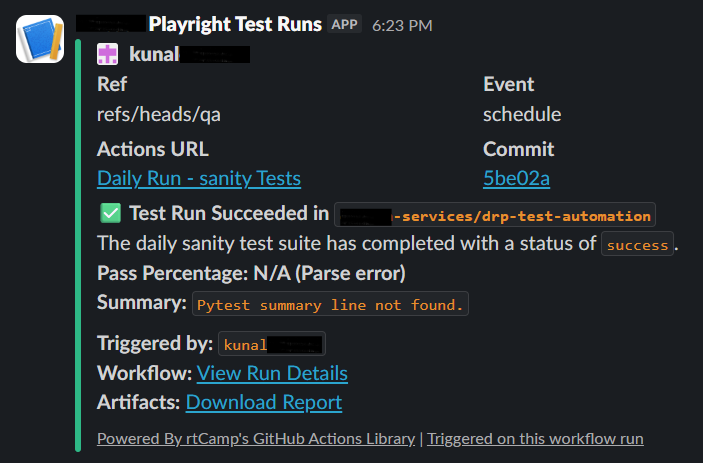
This integration shows how GitHub Actions workflows extend beyond GitHub itself. Your notifications reach your team through their preferred communication platform.
Google chat notifications
Google Chat works similarly to Slack. Create a webhook in Google Chat, then configure your GitHub Actions workflow to send notifications through it. This follows the same pattern as Slack integration but works with Google's chat platform.
- name: Notify GChat
  if: always()
  run: |
    curl -X POST -H 'Content-Type: application/json' \
    -d "{
      \"text\": \"GitHub Action Completed. Status: ${{ job.status }}\"
    }" \
    ${{ secrets.GCHAT_WEBHOOK }}
Both Slack and Google Chat integrations demonstrate the flexibility of GitHub Actions best practices. Your notification strategy isn't locked into GitHub — it adapts to your team's existing tools.
Historical test data: Dashboards and reporting
Individual test runs matter, but trends matter more. Historical data shows whether code quality is improving or declining. Long-term dashboards reveal patterns that single runs cannot show. Building historical dashboards is a key part of GitHub Actions CI/CD pipeline maturity.
Option 1: GitHub actions insights dashboard (Built-in)
GitHub automatically stores workflow history. Access it at Repository → Insights → Actions. This dashboard shows you workflow duration trends, success rate over time, and performance patterns. It's the simplest way to start tracking GitHub Actions workflows health without building custom tooling.
The built-in dashboard answers key questions: Are tests getting faster or slower? Is the success rate improving? Is there a pattern to failures? These insights come from GitHub Actions built-in storage without any additional setup.
Option 2: Custom dashboard using GitHub API
For more control over how you visualize GitHub Actions workflows data, fetch workflow data via REST API and build a custom dashboard. This approach lets you combine test data with other metrics and display it however your organization needs.
Fetch workflow runs via this REST API endpoint:
import requests

url = "https://api.github.com/repos/ORG/REPO/actions/runs"
headers = {"Authorization": "Bearer YOUR_TOKEN"}

response = requests.get(url, headers=headers)
print(response.json())
API endpoint: GET /repos/{owner}/{repo}/actions/runs
Custom dashboards are one of the GitHub Actions best practices for enterprise teams. You can combine workflow data with test metrics, deployment info, and team metrics in one view.
Option 3: Store results in S3 + generate HTML report
Store results in S3 or artifacts, then generate HTML reports and deploy them to GitHub Pages. This creates a permanent historical record that your entire team can access anytime.
- name: Upload HTML Report
  uses: actions/upload-artifact@v4
  with:
    name: html-report
    path: reports/index.html
Deploy to GitHub Pages for permanent historical tracking accessible to your entire team. This approach is part of the GitHub Actions best practices for documentation and historical audit trails.
Enterprise-ready GitHub actions CI/CD pipeline
Building a production GitHub Actions CI/CD pipeline brings together everything discussed: triggering, testing, reporting, and notifications. This example represents how enterprise teams structure their GitHub Actions test automation workflows.
A complete enterprise GitHub Actions workflow includes all these components:
name: Enterprise Test Pipeline

on:
  push:
    branches: [main]

jobs:
  test:
    runs-on: ubuntu-latest

    steps:
      - uses: actions/checkout@v4

      - uses: actions/setup-node@v4
        with:
          node-version: 20

      - run: npm install

      - run: npm test -- --ci --reporters=default --reporters=jest-junit
        continue-on-error: true

      - uses: dorny/test-reporter@v1
        if: always()
        with:
          name: Automation Results
          path: junit.xml
          reporter: jest-junit

      - uses: actions/upload-artifact@v4
        with:
          name: junit-results
          path: junit.xml

      - name: Slack Notification
        if: always()
        run: |
          curl -X POST -H 'Content-type: application/json' \
          --data "{\"text\":\"Test run: ${{ job.status }}\"}" \
          ${{ secrets.SLACK_WEBHOOK_URL }}
This workflow demonstrates the complete GitHub Actions for CI CD pattern. Checkout → Test → Report → Notify. Each stage flows into the next, creating a seamless automation pipeline.
Business value: Why GitHub actions test automation matters
The technical implementation is just the foundation. The real value comes from what GitHub Actions test automation enables your business to do: ship faster, with higher quality, and more confidence.
Cost reduction
- No need for separate CI server
- No infrastructure maintenance
- Pay only for usage minutes
- Scales automatically
Faster time-to-market
- Automated PR validation
- Immediate feedback
- Reduced manual QA effort
Transparency
- PR-based test visibility
- Slack alerts for leadership
- Historical trend dashboards
Risk reduction
- Prevent broken builds
- Catch regressions early
- Audit-ready test history
Best practices standardization
Teams operating with GitHub Actions workflows follow consistent patterns. New developers onboard faster because testing processes are standardized and visible. Code reviews improve because test failures are impossible to miss.
When your entire team uses the same GitHub Actions workflows patterns, knowledge transfers faster. There's no tribal knowledge about how testing works — it's visible in the workflow files themselves.
Cost comparison
| Traditional CI | GitHub Actions |
|---|---|
| Dedicated servers | Cloud runners |
| Maintenance overhead | Fully managed |
| Manual scaling | Auto-scaling |
| Separate tools for reporting | Integrated |
Getting started with GitHub actions test automation
GitHub Actions test automation transforms testing from a manual bottleneck into continuous, automated validation. Start small with test execution and basic reporting. Add Slack notifications to make failures visible. Layer in historical dashboards as your pipeline matures.
Building enterprise-grade GitHub Actions CI/CD pipeline systems requires more than documentation. It requires hands-on expertise, architectural decisions, and integration with your existing tools and workflows.
Opcito specializes in test automation services and CI/CD transformation. Our team has implemented GitHub Actions workflows at scale for enterprises handling thousands of tests daily. We handle the complexity — framework selection, reporting integration, advanced dashboard design, and team enablement — so you can focus on shipping quality code.
Whether you're building your first GitHub action workflow or scaling enterprise systems, contact our experts to discuss how Opcito can accelerate your test automation transformation.
Comments
Related Blog /Articles




Ready to transform your FinTech Application?
Explore our VAPT as a Service portfolio or speak with our team to discuss your security testing requirements.