
 Security Product Engineering
















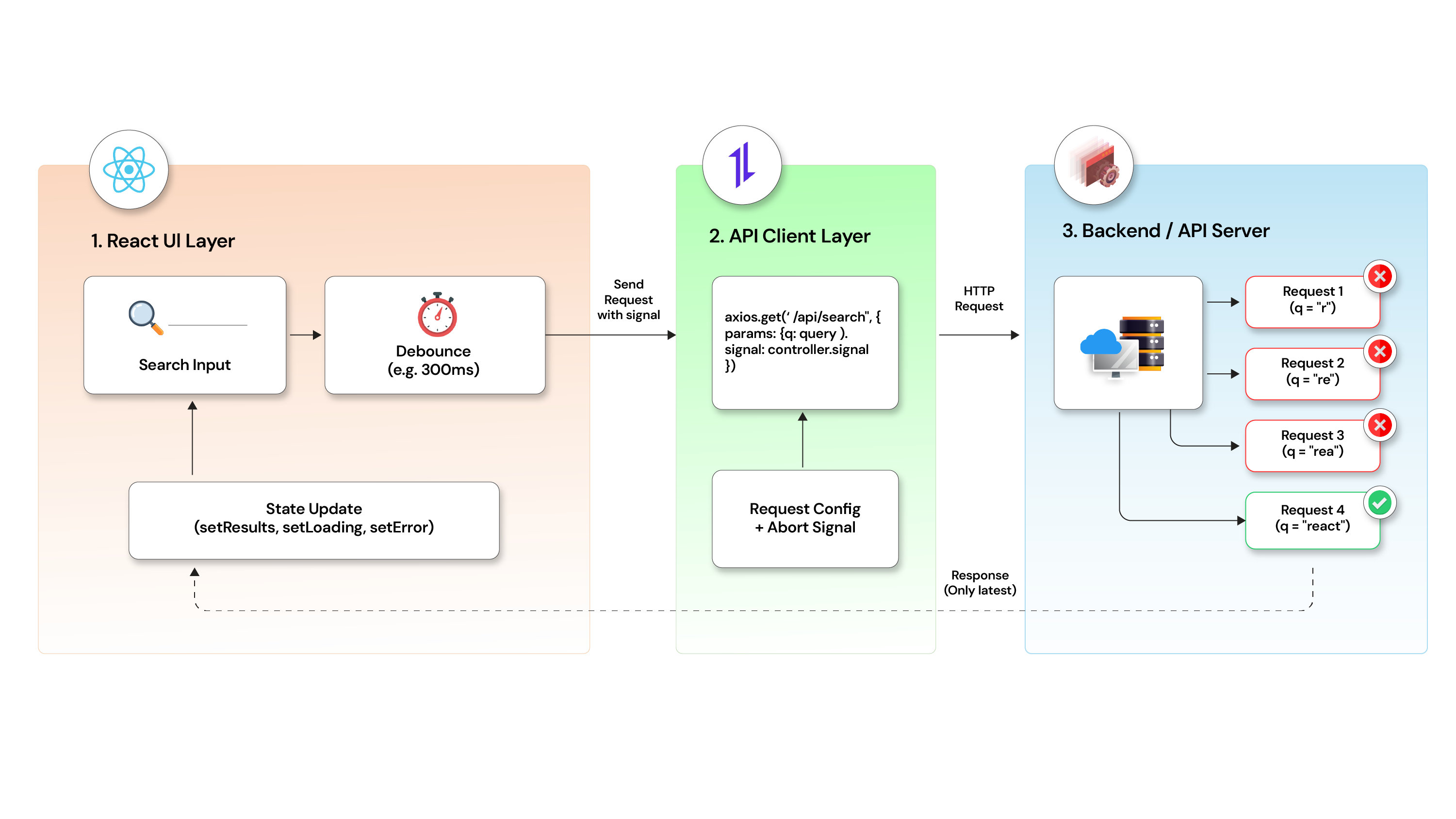
When users type into a search field, your app fires an API call on each input change. Fast typists can trigger five requests in a second. The problem is not the number of calls — it is that responses arrive out of order. An older, slower request can resolve after a newer one, and the newer one can overwrite the correct results on screen.
This guide shows exactly how to cancel API requests in React using AbortController, paired with debounce, so only the latest request ever updates the UI.
The race condition problem
Here is what happens without request cancellation:
- User types "re" → Request A fires
- User types "rea" → Request B fires
- Request B resolves first → UI shows correct results for "rea"
- Request A resolves late → UI is overwritten with stale results for "re"
This is a race condition. The UI displays data from an older query, not the one the user is currently looking at.
Without cancellation vs. with AbortController:
| Without Cancellation | With AbortController |
|---|---|
| Stale results overwrite fresh ones | Previous request aborted before next fires |
| UI shows incorrect data | UI only updates from the latest request |
| Every in-flight request runs to completion | Aborted requests free up network resources |
| Unnecessary backend load | Cleaner, predictable state |
Why this matters
- Incorrect results are displayed to the user.
- Race conditions cause unpredictable UI behavior.
- Every in-flight request adds unnecessary load to your backend.
- Users lose trust in the search experience.
The solution: Cancel previous requests
Cancel the previous API call before firing a new one. This guarantees that only the latest request can update the UI. The browser drops the old request, and your state stays clean.
Why does debounce alone not fix this?
Debounce reduces how often a function fires by waiting for a pause in user input. It delays the API call — it does not cancel one that is already in flight.
If a request takes longer than the debounce delay, you are back to the same race condition. Debounce and request cancellation solve different problems. You need both.
| Technique | Reduces API Call Frequency | Cancels In-Flight Requests |
|---|---|---|
| Debounce | Yes | No |
| AbortController | No | Yes |
| Both together | Yes | Yes |
How AbortController works
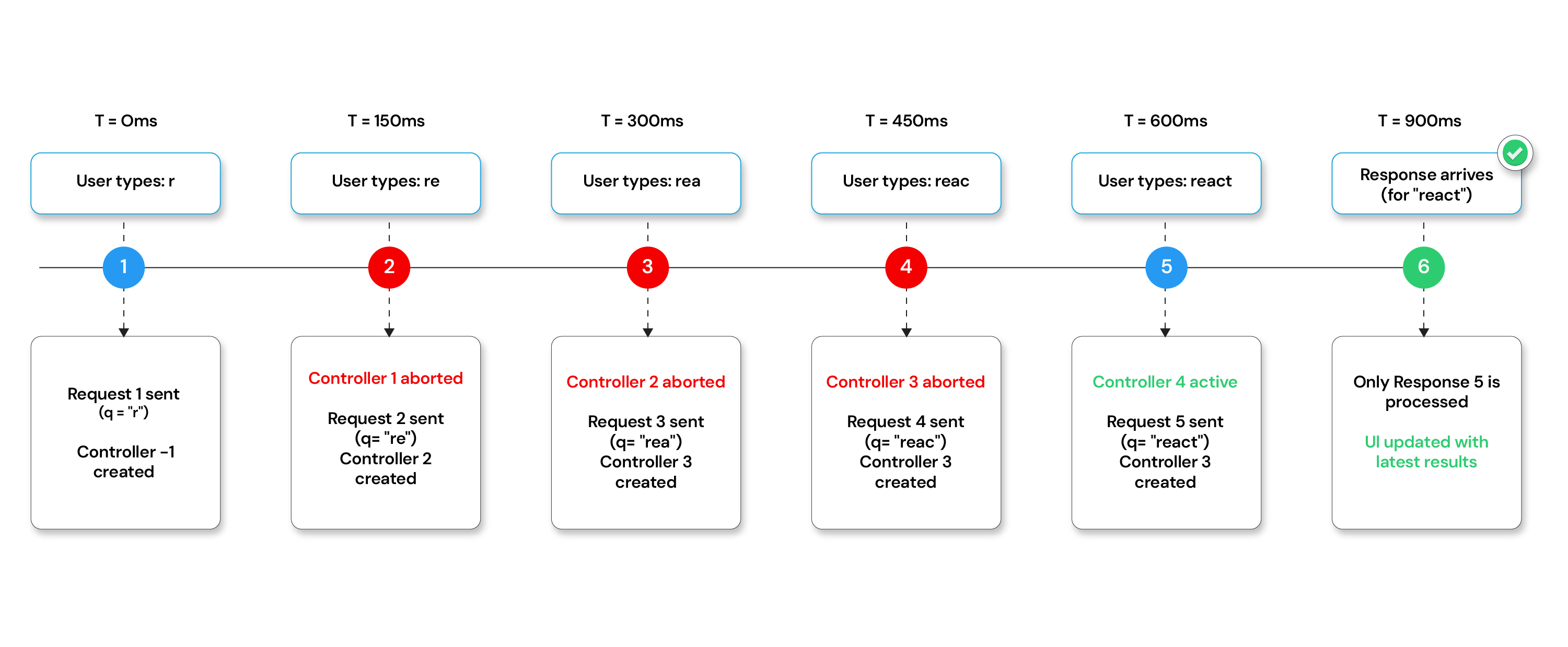
AbortController is a native browser API. It gives you a signal object that you pass to a fetch or Axios request. Calling .abort() on the controller sends a cancellation signal to that request. The browser then stops processing it.
Axios supports AbortController natively via the signal config option. When a request is aborted, Axios throws an error with the code ERR_CANCELED.
Implementation (React + Axios + AbortController)
Here is what the implementation involves, before we walk through each step:
- Step 1: Create a controller reference
- Step 2: Cancel the previous request before making a new one
- Step 3: Use debounce
- Step 4: Trigger on input change
Full code example
The following is the complete implementation. The code requires React and Axios.
const controllerRef = useRef(null);

const fetchSearchResults = async (query) => {
  if (controllerRef.current) {
    controllerRef.current.abort();
  }

  controllerRef.current = new AbortController();

  try {
    const response = await axios.get("/api/search", {
      params: { q: query },
      signal: controllerRef.current.signal,
    });
    console.log(response.data);
  } catch (error) {
    if (error.code === "ERR_CANCELED") {
      console.log("Request canceled");
    } else {
      console.error(error);
    }
  }
};
What happens when a request is aborted
On the client: Axios throws an error with error.code === "ERR_CANCELED". This is expected behavior, not an application error. Catch it explicitly and handle it silently — do not show an error message to the user for a canceled request.
On the server: Aborting a request closes the connection from the client side. Whether the server stops processing depends on the server implementation. Most Node.js servers will terminate the request handler when the client disconnects, but this is not guaranteed across all backends. The primary benefit of AbortController is on the client: it prevents stale responses from updating the UI.
Common mistakes to avoid
- Not checking for ERR_CANCELED: If you catch all errors the same way, aborted requests are logged as failures. Always check
error.code === "ERR_CANCELED"before deciding how to handle the error. - Creating a new controller without aborting the old one: Always abort the previous controller before creating a new one. Skipping the abort step defeats the purpose — the old request stays in flight.
- Using useState for the controller: Storing the
AbortControllerin state causes unnecessary re-renders. UseuseRefinstead. - Skipping cleanup on component unmount: If the component unmounts while a request is in flight, the request can still attempt to update state and cause a memory leak or a React warning. Abort the controller in the cleanup function of a
useEffectif applicable.
Cleanup on unmount
If you trigger the fetch inside a useEffect, return a cleanup function that aborts any pending request when the component unmounts.
useEffect(() => {

  controllerRef.current = new AbortController();


  fetchSearchResults(query);


  return () => {

    controllerRef.current.abort(); // Cancel on unmount

  };

}, [query]);
Key Takeaways
- Debounce: Delays API calls. Does not cancel in-flight requests.
- AbortController: Cancels in-flight requests. Use it alongside debounce, not instead of it.
- useRef: Persists the controller across renders without causing re-renders.
- ERR_CANCELED: Axios error code for aborted requests. Handle it separately — it is not a real error.
- Unmount cleanup: Abort pending requests in useEffect cleanup to avoid memory leaks.
If you need help implementing this pattern in a production React application, Opcito’s experts are available to assist you.
Comments
Related Blog /Articles





Ready to transform your FinTech Application?
Explore our VAPT as a Service portfolio or speak with our team to discuss your security testing requirements.